
繁沙
发布于: 2024-08-08
更新于: 2025-10-19
字数: 0
时长: 0 分钟
阅读量: ∞
前言
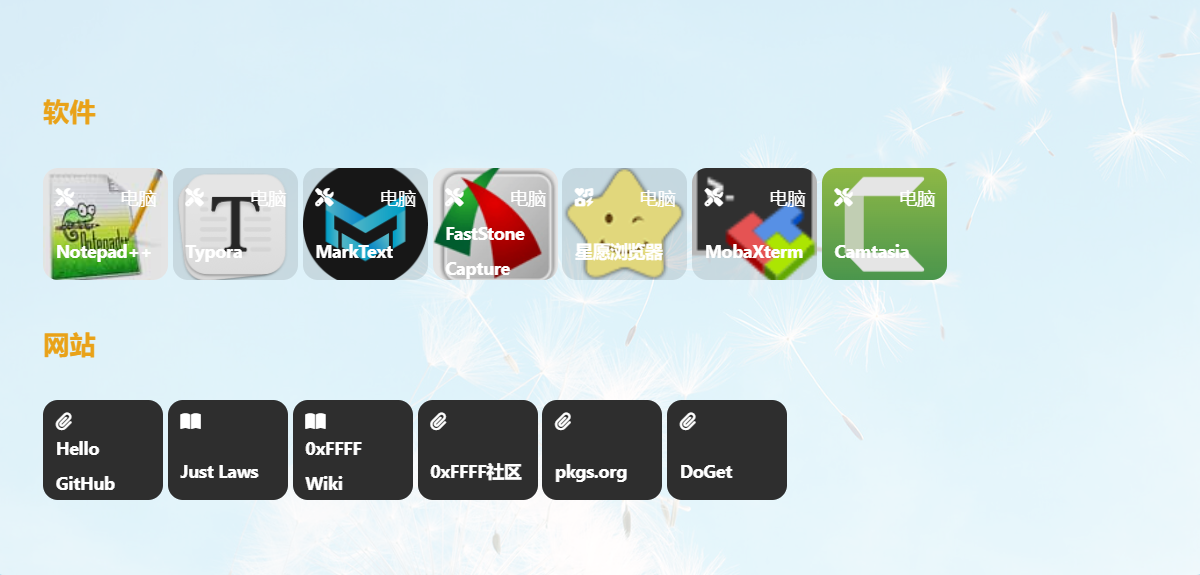
平时在工作和生活中,有一些很好用的软件、网站,就想着找一个地方都给记下来。在创建hexo博客时,看到了有在博客里添加网站导航的,感觉这样挺不错的,也就有了繁沙:一个搜录(个人)好用软件和网站的地方。样式借用了Leonus 博主的作品推荐卡片—标签外挂 | Leonus,做了一点修改适配:
卡片盒子可一行放多个盒内的提示文本内容转成了一个外部独立显示的提示框文本(尚待优化,若有好的优化方式,请Q我一下),具体效果可以点击下面的按钮预览。
查看预览效果
教程
(1)在博客根目录\themes\butterfly\scripts\tag中创建card.js 并粘入以下代码:
js
/**
 * card
 * {% card name,url,bg,star,text,icon,tag,w,h %}
 * {% card 标题,链接,背景,评分,评价,图标,标签,宽度,高度 %}
 */

'use strict'

// 分数转成星星
function tostar(num) {
    let tmp = ''
    for (let i = 0; i < Math.floor(num); i++) { tmp += '<i class="fa-solid fa-star" style="color: #FFB636;"></i>' } // 整数部分加实心星星
    if (num - Math.floor(num) != 0) tmp += '<i class="fa-solid fa-star-half-alt" style="color: #FFB636;"></i>' // 小数部分转成半星
    for (let i = 0; i < 5 - Math.ceil(num); i++) { tmp += '<i class="fa-regular fa-star"></i>' } // 不够5个补空心星星
    return tmp
}

function card(args) {
    args = args.join(' ').split(',')

    // 获取参数
    let name = (args[0] || '未知').trim()
    let url = (args[1] || '').trim()
    let bg = (args[2] ? `background-image: url(${args[2]});` : 'background-color: #333;').trim()
    let star = tostar(Number(args[3]) || 0)
    let text = (args[4] || '暂无说明').trim()
    let icon = (args[5] || '').trim()
    let tag = (args[6] || '').trim()
    let w = args[7] || '200px'
    let h = args[8] || '275px'

    return `<div title="${name}" referrerPolicy="no-referrer" class="card_box" style="${bg} width:${w}; height:${h};">
    <div class="card_mask">
      <span class="tooltiptext">${text}</span>  //此处新添加了tooltiptext类名,添加了新css样式
      ${url?'<a href="'+url+'">查看详情</a>':''}
    </div>
    <div class="card_top">
      <i class="${icon}"></i>
      <span>${tag}</span>
    </div>
    <div class="card_content">
      <span>${name}</span>
      <div>${star}</div>
    </div>
  </div>`
}

hexo.extend.tag.register('card', card, { ends: false })
(2)在 博客根目录\themes\butterfly\source\css\_tags 中创建 card.styl 并粘入以下代码:
js
.card_box
  display: inline-flex       //此处将flex改为inline-flex,使得card盒子可以一行放多个
  justify-content: space-between
  flex-direction: column
  background-position: center
  background-size: cover
  border-radius: 12px
  position: relative
  overflow: hidden
  padding: 10px
  color: #fff !important
  margin: 10px auto
  &::after
    content: ''
    position: absolute
    height: 100%
    width: 100%
    left: 0
    top: 0
    background: rgba(0,0,0,0.1)
    transition: .5s
    z-index: 0
  &:hover
    .card_mask
      opacity: 1
      pointer-events: auto
  .card_top
    display: flex
    z-index: 1
    align-items: center
    justify-content: space-between
  .card_mask
    position: absolute
    pointer-events: none
    z-index: 2
    transition: .5s
    opacity: 0
    width: 100%
    height: 100%
    left: 0
    top: 0
    padding: 20px
    background: #333
    span
      display: block
      height: calc(100% - 40px)
      overflow: auto
    a
      text-align: center
      background: #fff
      color: #333 !important
      border-radius: 5px
      position: absolute
      width: calc(100% - 40px)
      bottom: 20px
      left: 20px
      &:hover
        text-decoration: none !important
        color: white !important
        background: #49b1f5

  .card_content
    z-index: 1
    span
      font-size: 18px
      font-weight: bold

/* ##################这部分为新加样式代码################## */

/* card_mask 文本 */
.card_mask .tooltiptext {
    visibility: hidden;
    background-color: #f5f9fc;
    color: #000;
    text-align: center;
    padding: 5px 0;
    border-radius: 6px;

    /* 定位 */
    position: fixed;
    z-index: 1;
}

/* 鼠标移动上去后显示提示框 */
.card_mask:hover .tooltiptext {
     visibility: visible;
     max-width: 40%;
     word-wrap: break-word;
     text-align: center;
     max-height: 10%;
     top: 10%;
     padding: 5px;
     margin-right:20%;
}
/* ##################这部分为新加样式代码################## */

[data-theme='dark']
  .card_box
    color: #ddd !important
    &::after
      background: rgba(0,0,0,0.1)
应用
应用参数格式:
{% card 标题,链接,背景,评分,评价,图标,标签,宽度,高度 %}具体应用的参数应用访问Leonus | 作品推荐卡片—标签外挂的原链接查看。链接如下: