
随鼠标变幻的动态粒子线条背景
发布于: 2025-05-24
更新于: 2025-10-19
字数: 0
时长: 0 分钟
阅读量: ∞
INFO
本站中使用的动态粒子线条背景基于canvas-nest.js修改实现,可进行自定义设置,自定义配置项位于background.js的最后/* 自定义修改配置项 */部分。
- 颜色模式分为
自定义(custom)和彩虹色(rainbow) - 连线类型支持
渐变色(gradient)和单一色(solid) - 连线宽度可自定义
- 粒子尺寸可自定义
- 粒子运动速度可自定义
自定义配置项
background.js的最后/* 自定义修改配置项 */部分的相关配置项如下:
| 配置项 | 类型/可选值 | x comments: use: Gitalk # Gitalk# https://github.com/gitalk/gitalkgitalk: client_id: #Client ID client_secret: #Client secrets repo: #仓库名 owner: #GitHub用户名 admin: #GitHub用户名 option: language: zh-CN #每页展示数量,最多100 perPage: 10 #评论框的全屏遮罩效果 distractionFreeMode: false #评论排序方式last、first pagerDirection: last #GitHub issue的标签 labels: ['Gitalk'] #是否启用快捷键(cmd|ctrl + enter) 提交评论 enableHotKey: true #评论列表的动画 flipMoveOptions: Fade #GitHub oauth 请求到反向代理 proxy: https://cors-anywhere.azm.workers.dev/https://github.com/login/oauth/access_tokenyaml | 说明 | 注意事项 |
|---|---|---|---|---|
| colorType | "rainbow" | "custom" | "rainbow" | 粒子颜色模式: • rainbow:动态HSL彩虹色 • custom:需配合 colors参数使用 |
| colors | HEX格式数组 | ["#FF6B6B","#4ECDC4","#45B7D1"] | 自定义颜色池(仅colorType=custom时生效) | 最少提供2个颜色,建议3-5个渐变色 |
| lineType | "gradient" | "solid" | "gradient" | 连线渲染模式: • gradient:粒子间颜色渐变 • solid:使用起点粒子颜色 |
| particleCount | 整数(建议50-200) | 80 | 粒子总数 | 数值越大性能消耗越大(n²复杂度) |
| maxDistance | 整数(像素平方) | 6000 | 连线最大距离(实际距离=√值,默认≈77px) | 值越大连接越多,建议移动端减少该值 |
| particleSize | 数值(1-5) | 2 | 粒子显示尺寸(单位:像素) | 大于3px会呈现明显方块效果 |
| lineWidth | 数值(0.5-2) | 1 | 基础连线宽度(实际宽度=值×(1-距离/maxDistance)) | 建议保持≤1.5以避免线条过粗 |
| opacity | 0-1 | 0.6 | 画布整体透明度 | 0.3-0.7效果最佳,过高会遮挡内容 |
| zIndex | 整数 | -1 | 画布CSS层级 | 建议作为背景时设为-1,悬浮效果时可设>0 |
| velocity | number | 0.8 | 基础移动速度系数,值越大粒子运动越快 | |
| speedVariation | number | 0.3 | 速度随机变化范围(0-1),值越大不同粒子速度差异越明显 |
特殊参数说明
颜色系统
colorType=rainbow时:粒子生成HSL色相(hsl(随机0-360°,70%,60%))colorType=custom时:必须配置colors参数(例:["#2B6CB0","#4299E1"])velocity:全局速度系数,等比例影响所有粒子,设置velocity=0可冻结粒子speedVariation:个体速度差异系数(0=所有粒子同速,1=最大差异±50%)
性能优化建议
javascript复制代码
js// 移动端推荐配置 new ParticleBackground(container, { particleCount: 60, maxDistance: 4000, lineWidth: 0.8 })
效果预览
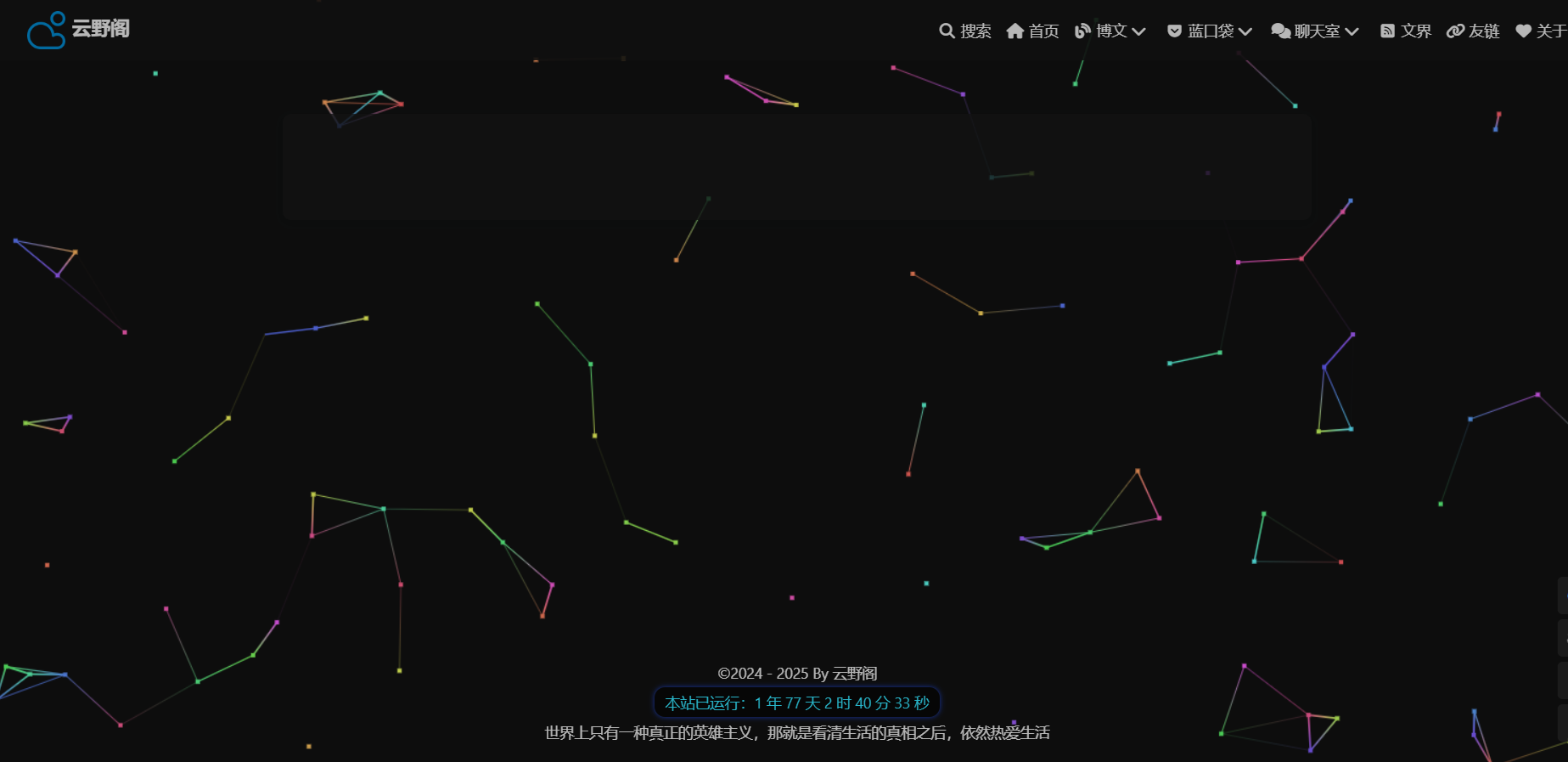
添加js文件
在blog\source\js目录下,创建background.js文件,加入以下内容。
js
!function(){'use strict';

/* 工具模块 */
const Utils = {
    debounce: (func, wait = 30) => {
        let timeout;
        return (...args) => {
            clearTimeout(timeout);
            timeout = setTimeout(() => func.apply(this, args), wait);
        }
    },
    uuid: () => {
        let d = Date.now();
        return 'xxxxxxxx-xxxx-4xxx-yxxx-xxxxxxxxxxxx'.replace(/[xy]/g, c => {
            const r = (d + Math.random() * 16) % 16 | 0;
            d = Math.floor(d / 16);
            return (c === 'x' ? r : (r & 0x3 | 0x8)).toString(16);
        });
    }
};

/* 尺寸传感器 */
class SizeSensor {
    static sensors = new Map();

    static observe(element, callback) {
        const sensor = new ResizeObserver(Utils.debounce(() => {
            callback(element);
        }));
        sensor.observe(element);
        this.sensors.set(element, sensor);
    }

    static unobserve(element) {
        const sensor = this.sensors.get(element);
        if(sensor) {
            sensor.disconnect();
            this.sensors.delete(element);
        }
    }
}

/* 粒子系统核心 */
class ParticleBackground {
    constructor(container, options = {}) {
        this.container = container;
        this.options = {
            colorType: 'rainbow',
            colors: ['#FF6B6B', '#4ECDC4', '#45B7D1'],
            lineType: 'gradient',
            particleCount: 80,
            maxDistance: 6000,
            particleSize: 2,
            lineWidth: 1,
            opacity: 0.6,
            zIndex: -1,
            velocity: 0.8,          // 新增:基础速度系数
            speedVariation: 0.3,    // 新增:速度随机变化范围
            ...options
        };

        this.initCanvas();
        this.initParticles();
        this.bindEvents();
        this.startAnimation();
    }

    initCanvas() {
        this.canvas = document.createElement('canvas');
        this.ctx = this.canvas.getContext('2d');

        Object.assign(this.canvas.style, {
            position: 'absolute',
            top: '0',
            left: '0',
            zIndex: this.options.zIndex,
            opacity: this.options.opacity
        });

        this.container.appendChild(this.canvas);
        this.resizeCanvas();
    }

    resizeCanvas() {
        this.canvas.width = this.container.clientWidth;
        this.canvas.height = this.container.clientHeight;
    }

    initParticles() {
        this.particles = Array.from({length: this.options.particleCount}, (_, i) => {
            // 速度计算逻辑优化
            const baseSpeed = this.options.velocity *
                (1 + this.options.speedVariation * (Math.random() - 0.5));

            return {
                id: i,
                x: Math.random() * this.canvas.width,
                y: Math.random() * this.canvas.height,
                vx: (Math.random() - 0.5) * baseSpeed,
                vy: (Math.random() - 0.5) * baseSpeed,
                color: this.generateColor(),
                connections: new Set()
            };
        });

        this.mouse = { x: null, y: null };
    }

    generateColor() {
        if(this.options.colorType === 'custom') {
            return this.options.colors[
                Math.floor(Math.random() * this.options.colors.length)
            ];
        }
        return `hsl(${Math.random()*360}, 70%, 60%)`;
    }

    bindEvents() {
        SizeSensor.observe(this.container, () => this.resizeCanvas());

        this.mouseHandler = e => {
            const rect = this.container.getBoundingClientRect();
            this.mouse.x = e.clientX - rect.left;
            this.mouse.y = e.clientY - rect.top;
        };

        this.container.addEventListener('mousemove', this.mouseHandler);
        this.container.addEventListener('mouseleave', () => {
            this.mouse.x = null;
            this.mouse.y = null;
        });
    }

    updateParticles() {
        this.particles.forEach(p => {
            // 应用速度系数
            p.x += p.vx * this.options.velocity;
            p.y += p.vy * this.options.velocity;

            // 边界反弹
            if(p.x < 0 || p.x > this.canvas.width) p.vx *= -1;
            if(p.y < 0 || p.y > this.canvas.height) p.vy *= -1;

            p.x = Math.max(0, Math.min(p.x, this.canvas.width));
            p.y = Math.max(0, Math.min(p.y, this.canvas.height));
        });
    }

    drawConnections() {
        const allPoints = [...this.particles];
        if(this.mouse.x !== null) allPoints.push(this.mouse);

        for(let i = 0; i < allPoints.length; i++) {
            const p1 = allPoints[i];

            for(let j = i+1; j < allPoints.length; j++) {
                const p2 = allPoints[j];
                const dx = p1.x - p2.x;
                const dy = p1.y - p2.y;
                const distSq = dx*dx + dy*dy;

                if(distSq < this.options.maxDistance) {
                    const gradient = this.ctx.createLinearGradient(
                        p1.x, p1.y, p2.x, p2.y
                    );
                    gradient.addColorStop(0, p1.color);
                    gradient.addColorStop(1, p2.color || p1.color);

                    this.ctx.strokeStyle = this.options.lineType === 'gradient'
                        ? gradient
                        : p1.color;

                    this.ctx.lineWidth = this.options.lineWidth *
                        (1 - distSq/this.options.maxDistance);

                    this.ctx.beginPath();
                    this.ctx.moveTo(p1.x, p1.y);
                    this.ctx.lineTo(p2.x, p2.y);
                    this.ctx.stroke();
                }
            }
        }
    }

    drawParticles() {
        this.particles.forEach(p => {
            this.ctx.fillStyle = p.color;
            this.ctx.fillRect(
                p.x - this.options.particleSize/2,
                p.y - this.options.particleSize/2,
                this.options.particleSize,
                this.options.particleSize
            );
        });
    }

    animate() {
        this.ctx.clearRect(0, 0, this.canvas.width, this.canvas.height);
        this.updateParticles();
        this.drawConnections();
        this.drawParticles();
        requestAnimationFrame(() => this.animate());
    }

    startAnimation() {
        this.animationFrame = requestAnimationFrame(() => this.animate());
    }

    destroy() {
        cancelAnimationFrame(this.animationFrame);
        SizeSensor.unobserve(this.container);
        this.container.removeEventListener('mousemove', this.mouseHandler);
        this.canvas.remove();
    }
}

/* 自定义修改配置项 */
new ParticleBackground(document.body, {
    colorType: 'rainbow',
    //colors: [],       //colorType为custom时开启
    lineType: 'gradient',
    particleCount: 80,
	lineWidth: 2,
	particleSize: 3,
    maxDistance: 8000,
    velocity: 1.2,
    speedVariation: 0.3,
    zIndex: -1,
    opacity: 0.7
});

}();
配置生效
在_config.butterfly.yml里面的inject的bottom中引入js文件的路径。
yaml
inject:
 .........
  bottom:
     - <script defer src="/js/background.js?1"></script> # 动态粒子线条背景