
功能魔改(源码方式)
最新文章标志
INFO
本站采用的最新文章标志,在参考了博客文章轻笑Chuckle | Butterfly文章卡片加上最新文章标志和Leonus | 几行代码实现最新文章标志。实现方式是通过获取md文章的发布日期,动态比对文章的发布日期,实现精确标记最新文章。
在blog\themes\butterfly\scripts\helpers\page.js文件最后加入以下内容。
// 最新文章
hexo.extend.helper.register('isNewPost', function(post) {
  const latest = hexo.locals.get('posts').sort('-date').first();
  return latest && latest.date === post.date;
});在blog\themes\butterfly\layout\includes\mixins\indexPostUI.pug文件中的.recent-post-info(class=no_cover)下面加入以下两行内容。
          .recent-post-info(class=no_cover)
            if isNewPost(article)
span.newPost 最新在blog\source目录下创建css文件夹,并在css文件夹下创建css文件,加入以下内容。(标签样式进行了微调)
/* 最新文章图标 */
.newPost {
  position: absolute;
  top: 10px;
  right: 12px;
  color: white;
  padding: 0 12px;
  background-color: #49b1f5;
  box-shadow: 0 8px 12px -3px rgba(73,177,245, .20);
  border-radius: 6px;
  border: var(--style-border);
  letter-spacing: 1px;
}
@media screen and (max-width:768px){
  .newPost {
        top: -20px;
        right: 12px;
        color: white;
        padding: 0 12px;
        border-radius: 6px;
  }
}在_config.butterfly.yml里面的inject的head中引入css文件的路径。
inject:
  head:
     - <link rel="stylesheet" href="/css/xxx.css?1">
随机一篇
TIP
2025-10-05 更新记录:取消硬编码特定的域名,自适应当前的域名环境。
在blog目录下的命令指示符中执行安装baidusitemap插件:
npm install hexo-generator-baidu-sitemap --save在blog\source目录下创建js文件夹,并在js文件夹下创建js文件,加入以下内容。
function randomPost() {
    // 使用相对路径获取sitemap,不依赖域名
    fetch('/baidusitemap.xml')
        .then(res => res.text())
        .then(str => (new window.DOMParser()).parseFromString(str, "text/xml"))
        .then(data => {
            let ls = data.querySelectorAll('url loc');
            let currentUrl = window.location.pathname; // 只使用路径部分,不包含域名

            // 过滤掉当前页面的URL
            let availableUrls = Array.from(ls)
                .map(loc => {
                    // 从完整URL中提取路径部分
                    let url = new URL(loc.innerHTML);
                    return url.pathname;
                })
                .filter(url => url !== currentUrl);

            if (availableUrls.length === 0) {
                console.warn('No different URLs found in sitemap');
                return;
            }

            // 随机选择一个URL并跳转
            let randomIndex = Math.floor(Math.random() * availableUrls.length);
            window.location.href = availableUrls[randomIndex];
        })
        .catch(error => {
            console.error('Failed to fetch or parse sitemap:', error);
        });
}在_config.butterfly.yml里面的inject的bottom中引入js文件的路径。
inject:
 .........
  bottom:
     - <script src="/js/xxx.js?1"></script>
文章双栏卡片
打开blog目录下的Butterfly配置文件_config.butterfly.yml,修改卡片双栏布局为7。
#首页卡片双栏布局
index_layout: 7
#选择首页卡片双栏布局时,关闭主页文章节选,不会出现卡片混乱的情况
index_post_content:
method: false在blog\source\css的css文件中加入以下内容。
/* 文章双栏样式微调 */
#recent-posts .recent-post-item .post_cover:before {
  position: absolute;
  z-index: 1;
  width: 100%;
  height: 100%;
  background-color: rgba(0,0,0,0.2);
  backdrop-filter: blur(0px);
}
#recent-posts .recent-post-item >.recent-post-info {
  padding: 30px 30px 25px;
  height: 100%;

}
#recent-posts .recent-post-item > .recent-post-info > .content {
    display: none;
}
#recent-posts .recent-post-item >.recent-post-info > .article-title {
  color: var(--text-highlight-color);
  font-size: 1.5em;
  line-height: 5;
  -webkit-transition: all 0.2s ease-in-out;
  -moz-transition: all 0.2s ease-in-out;
  -o-transition: all 0.2s ease-in-out;
  -ms-transition: all 0.2s ease-in-out;
  transition: all 0.2s ease-in-out;
  white-space: nowrap;
  overflow: hidden;
  text-overflow: ellipsis;
  display: block;
}
文章顶部添加波浪效果
在blog\themes\butterfly\layout\includes\header\index.pug文件的第33行include ./post-info.pug下面加入内容。
      section.main-hero-waves-area.waves-area
        svg.waves-svg(xmlns='http://www.w3.org/2000/svg', xlink='http://www.w3.org/1999/xlink', viewBox='0 24 150 28', preserveAspectRatio='none', shape-rendering='auto')
          defs
            path#gentle-wave(d='M -160 44 c 30 0 58 -18 88 -18 s 58 18 88 18 s 58 -18 88 -18 s 58 18 88 18 v 44 h -352 Z')
          g.parallax
            use(href='#gentle-wave', x='48', y='0')
            use(href='#gentle-wave', x='48', y='3')
            use(href='#gentle-wave', x='48', y='5')
use(href='#gentle-wave', x='48', y='7')在blog\source\css的css文件中加入以下内容。
/* 波浪css */
.main-hero-waves-area {
  width: 100%;
  position: absolute;
  left: 0;
  bottom: -11px;
  z-index: 5;
}
.waves-area .waves-svg {
  width: 100%;
  height: 5rem;
}
/* Animation */

.parallax > use {
  animation: move-forever 25s cubic-bezier(0.55, 0.5, 0.45, 0.5) infinite;
}
.parallax > use:nth-child(1) {
  animation-delay: -2s;
  animation-duration: 7s;
  fill: #f7f9febd;
}
.parallax > use:nth-child(2) {
  animation-delay: -3s;
  animation-duration: 10s;
  fill: #f7f9fe82;
}
.parallax > use:nth-child(3) {
  animation-delay: -4s;
  animation-duration: 13s;
  fill: #f7f9fe36;
}
.parallax > use:nth-child(4) {
  animation-delay: -5s;
  animation-duration: 20s;
  fill: #f7f9fe;
}
/* 黑色模式背景 */
[data-theme="dark"] .parallax > use:nth-child(1) {
  animation-delay: -2s;
  animation-duration: 7s;
  fill: #706d813e;
}
[data-theme="dark"] .parallax > use:nth-child(2) {
  animation-delay: -3s;
  animation-duration: 10s;
  fill: #706d813e;
}
[data-theme="dark"] .parallax > use:nth-child(3) {
  animation-delay: -4s;
  animation-duration: 13s;
  fill: #706d813e;
}
[data-theme="dark"] .parallax > use:nth-child(4) {
  animation-delay: -5s;
  animation-duration: 20s;
  fill: #706d813e;
}

@keyframes move-forever {
  0% {
    transform: translate3d(-90px, 0, 0);
  }
  100% {
    transform: translate3d(85px, 0, 0);
  }
}
/*Shrinking for mobile*/
@media (max-width: 768px) {
  .waves-area .waves-svg {
    height: 40px;
    min-height: 40px;
  }
}
实现参考原链接如下:

首页自定义页数跳转
在blog\themes\butterfly\layout\includes\pagination.pug文件中,找到else条件的最后一行!=paginator(options)下面,加入以下内容。
      if is_home()
        .toPageGroup
          input#toPageText(maxlength="3" oninput="value=value.replace(/[^0-9]/g,'')" onkeyup="if (this.value === '0') this.value = ''" title="跳转到指定页面")
          a#toPageButton(data-pjax-state="" onclick="icattoPage.toPage()")
i.fa-solid.fa-angles-right在blog\source\css的css文件中加入以下内容。
/***************************** 页数跳转按钮 *****************************/
.page .layout > .recent-posts .pagination > a:hover {
    background: #00c4b6;
}
/* 翻页按钮悬停颜色 */
.layout > .recent-posts .pagination > a {
  border: var(--style-border);
}
/* 调整添加原生边框 */
#pagination .pagination {
  position: relative;
  display: flex;
  justify-content: center;
  align-items: center;
}
.page .layout .recent-posts #pagination .pagination .prev {
  left: 0;
}
.page .layout .recent-posts #pagination .pagination .next {
  right: 0;
}
.page .layout .recent-posts #pagination .pagination .prev,
.page .layout .recent-posts #pagination .pagination .next {
  position: absolute;
  margin: 0 0;
  display: inline-flex;
  flex-wrap: wrap;
  justify-content: center;
  align-items: center;
  width: 5.25em;
  overflow: hidden;
}
.page .layout .recent-posts #pagination .pagination .prev:hover .pagination_tips_prev {
  margin-right: 2.5px;
  opacity: 1;
}
.page .layout .recent-posts #pagination .pagination .prev .pagination_tips_prev {
  margin-right: -28px;
  transition: margin-right .3s;
  opacity: 0;
}
.page .layout .recent-posts #pagination .pagination .next:hover .pagination_tips_next {
  margin-left: 2.5px;
  opacity: 1;
}
.page .layout .recent-posts #pagination .pagination .next .pagination_tips_next {
  margin-left: -28px;
  transition: margin-left .3s;
  opacity: 0;
}
@media screen and (max-width: 768px) {
  .page .layout .recent-posts #pagination .pagination .prev,
  .page .layout .recent-posts #pagination .pagination .next {
    position: sticky;
    margin: 0 6px;
    display: inline-block;
    width: 2.5em;
  }
  .page .layout .recent-posts #pagination .pagination .prev .pagination_tips_prev,
  .page .layout .recent-posts #pagination .pagination .next .pagination_tips_next {
    display: none;
  }
}
/* 上下页按钮魔改 */
.pagination input {
  width: 2.5em;
  height: 2.5em;
  border-radius: 8px;
  border: var(--style-border-always);
  transition: all 0.3s;
  outline-style: none;
  padding-left: 12px;
  background: #00c4b6;
  color: var(--icat-fontcolor);
}

.pagination .toPageGroup:hover input,.pagination .toPageGroup input:focus {
  border: 1px solid #00c4b6;
  outline-style: none;
  width: 100px;
}

.toPageGroup {
  display: inline-flex !important;
  position: relative;
  margin: 0 6px !important;
}

a#toPageButton {
  display: flex;
  position: absolute;
  width: 2.5em;
  height: 2.5em;
  border-radius: 8px;
  justify-content: center;
  align-items: center;
  transition: all 0.3s;
  background: var(--card-bg);
  border: var(--style-border-always);
  cursor: text !important;
  pointer-events: none;
}

.toPageGroup:hover a#toPageButton, .toPageGroup:focus-within a#toPageButton {
  margin-top: 4px;
  width: 27px;
  height: 27px;
  margin-left: 70px;
  background: var(--icat-card-bg);
  border: 1px solid var(--icat-none);
  border-radius: 4px;
  opacity: 0.2;
  transition: all 0.3s !important;
}

.toPageGroup:focus-within a#toPageButton.haveValue {
  opacity: 1;
  cursor: pointer;
}

a#toPageButton.haveValue {
  opacity: 1!important;
  cursor: pointer!important;
  pointer-events: all;
}

a#toPageButton.haveValue:hover {
  background: var(--icat-theme);
  color: var(--icat-white);
}

@media screen and (max-width: 768px) {
  .toPageGroup {
    display:  !important;
  }
}
i.fa-solid.fa-angles-right::before {
    color: #5d6c80;
}
/* 页数跳转按钮 */

/***************************** 页数跳转按钮 *****************************/在blog\source\js的js文件中加入以下内容。
优化了点击回车跳转失效的问题
// 自定页数跳转
var icattoPage = {
  toPage: function() {
      console.log("执行跳转");
      var pageElements = document.querySelectorAll(".page-number");
      var totalPages = parseInt(pageElements[pageElements.length - 1].innerHTML);
      var inputElement = document.getElementById("toPageText");
      var targetPage = parseInt(inputElement.value);

      // 验证输入有效性
      if (!isNaN(targetPage) && targetPage > 0 && targetPage <= totalPages) {
          var urlPath = targetPage === 1 ? "/" : "/page/" + targetPage + "/#content-inner";
          window.location.href = urlPath; // 直接修改location实现跳转
          return true; // 返回true允许表单提交(如果有form包裹)
      } else {
          alert("请输入有效的页码(1-" + totalPages + ")");
          inputElement.focus();
          return false; // 阻止默认行为
      }
  },

  listenToPageInputPress: function() {
      var inputElement = document.getElementById("toPageText");
      var buttonElement = document.getElementById("toPageButton");

      if (inputElement) {
          // 回车键监听
          inputElement.addEventListener("keydown", (e) => {
              if (e.keyCode === 13) { // 回车键
                  e.preventDefault(); // 阻止form的默认提交行为[3]
                  icattoPage.toPage();
              }
          });

          // 输入验证
          inputElement.addEventListener("input", function() {
              var pageElements = document.querySelectorAll(".page-number");
              var maxPage = parseInt(pageElements[pageElements.length - 1].innerHTML);
              var currentValue = parseInt(this.value) || 0;

              // 按钮状态控制
              buttonElement.classList.toggle("haveValue", this.value.length > 0 && this.value !== "0");

              // 自动修正超出范围的页码
              if (currentValue > maxPage) {
                  this.value = maxPage;
              }
          });
      }
  }
};

// 初始化监听
document.addEventListener("DOMContentLoaded", function() {
    icattoPage.listenToPageInputPress();
});
实现参考原链接如下:

全局半透明
在blog\source\css的css文件中加入以下内容。
/*全局半透明背景*/
#recent-posts>.recent-post-item,.layout_page>div:first-child:not(.recent-posts),.layout_post>#page,.layout_post>#post,.read-mode .layout_post>#post {
    background: rgba(255, 255, 255, 0.8);
}
[data-theme="dark"] #recent-posts>.recent-post-item,.layout_page>div:first-child:not(.recent-posts),.layout_post>#page,.layout_post>#post,.read-mode .layout_post>#post {
    background: #282c34c4;
}

#aside-content .card-widget {
    background: rgba(255, 255, 255, 0.8);
}
[data-theme="dark"] #aside-content .card-widget {
    background: #282c34c4;
}
div#archive {
    background: rgba(255, 255, 255, 0.8);
}
[data-theme="dark"] div#archive {
    background: #282c34c4;
}
div#page {
    background: rgba(255, 255, 255, 0.8);
}
[data-theme="dark"] div#page {
    background: #282c34c4;
}

div#post {
    background: rgba(255, 255, 255, 0.8);
}
[data-theme="dark"] div#post {
    background: #282c34c4;
}

div#tag {
    background: rgba(255, 255, 255, 0.8);
}
[data-theme="dark"] div#tag {
    background: #282c34c4;
}

div#category {
    background: rgba(255, 255, 255, 0.8);
}
[data-theme="dark"] div#category {
    background: #282c34c4;
}
[data-theme="dark"] #recent-posts .recent-post-item {
    background: #282c34c4;
}
[data-theme="dark"] #article-container .shuoshuo-item {
    background: #282c34c4;
}
[data-theme="dark"] .layout .pagination > *:not(.space)  {
    background: #282c34c4;
}
[data-theme="dark"] #nav .menus_items .menus_item:hover .menus_item_child {
    background: #282c34c4;
}
[data-theme="dark"] .search-dialog {
    background: #282c34c4;
}
显示文章描述(相关推荐、上下篇)
WARNING
适用于Butterfly-5.3.5版本,在Butterfly-5.5.1版本弃用
打开blog目录下的Butterfly配置文件_config.butterfly.yml,修改以下配置。
#启用相关文章推荐
related_post:
  enable: true
  limit: 6 # 显示推荐文章数目
  date_type: created # or created or updated 文章日期显示创建日或者更新日

#显示文章简介,设置显示长度
index_post_content:
  method: 2
length: 120在blog\themes\butterfly\scripts\helpers\related_post.js文件中添加以下内容(前面有加号的),显示推荐文章描述。
          weight: 1,
+          description: post.description,
+          content: post.content,
..........
      const { escape_html, url_for, date } = this
+      const description = this.strip_html(relatedPosts[i].description)
+      const content = this.strip_html(relatedPosts[i].content)

      result += `<div class="info-item-2">${title}</div></div>`
+      switch (config.index_post_content.method) {
+        case false:
+          break
+        case 1:
+          result += `<div class="info">${description}</div>`
+          break
+        case 2:
+          if (description) {
+            result += `<div class="info">${description}</div>`
+          }
+          else {
+            let expert = content.substring(0, config.index_post_content.length)
+            content.length > config.index_post_content.length ? expert += ' ...' : ''
+            result += `<div class="info">${expert}</div>`
+          }
+          break
+        default:
+          let expert = content.substring(0, config.index_post_content.length)
+          content.length > config.index_post_content.length ? expert += ' ...' : ''
+          result += `<div class="info">${expert}</div>`
+          break
+ }在blog\themes\butterfly\layout\includes\pagination.pug文件中添加以下内容(前面有加号的),显示上下篇文章描述。
            if getPostDesc
              .info-2
                .info-item-1!=getPostDesc
+                case theme.index_post_content.method
+                  when false
+                    - break
+                  when 1
+                    .content!= direction.description
+                  when 2
+                    if direction.description
+                      .content!= direction.description
+                    else
+                      - const content = strip_html(direction.content)
+                      - let expert = content.substring(0, theme.index_post_content.length)
+                      - content.length > theme.index_post_content.length ? expert += ' ...' : ''
+                      .content!= expert
+                  default
+                    - const content = strip_html(direction.content)
+                    - let expert = content.substring(0, theme.index_post_content.length)
+                    - content.length > theme.index_post_content.length ? expert += ' ...' : ''
+ .content!= expert在blog\source\css的css文件中加入以下内容。
/*上下篇文章描述显示*/
#pagination .pagination-related .info-2 .info-item-1 {
  display: none;

}
#pagination .content {
 display: -webkit-box;
  -webkit-line-clamp: 4;
  -webkit-box-orient: vertical;
  overflow: hidden;
  text-align: left;

}
@media (max-width: 768px) {
  #pagination .content {
    -webkit-line-clamp: 3;
  }
}
实现参考原链接如下:

博客文章统计图
在_config.butterfly.yml里面的inject的head中引入 ECharts.js文件的路径。
inject:
  head:
  ........
- <script src="https://npm.elemecdn.com/echarts@4.9.0/dist/echarts.min.js"></script>在blog\themes\butterfly\scripts\helpers\目录下创建charts.js,加入以下内容。
const cheerio = require('cheerio')
const moment = require('moment')

hexo.extend.filter.register('after_render:html', function (locals) {
  const $ = cheerio.load(locals)
  const post = $('#posts-chart')
  const tag = $('#tags-chart')
  const category = $('#categories-chart')
  const htmlEncode = false

  if (post.length > 0 || tag.length > 0 || category.length > 0) {
    if (post.length > 0 && $('#postsChart').length === 0) {
      if (post.attr('data-encode') === 'true') htmlEncode = true
      post.after(postsChart(post.attr('data-start')))
    }
    if (tag.length > 0 && $('#tagsChart').length === 0) {
      if (tag.attr('data-encode') === 'true') htmlEncode = true
      tag.after(tagsChart(tag.attr('data-length')))
    }
    if (category.length > 0 && $('#categoriesChart').length === 0) {
      if (category.attr('data-encode') === 'true') htmlEncode = true
      category.after(categoriesChart(category.attr('data-parent')))
    }

    if (htmlEncode) {
      return $.root().html().replace(/&#/g, '&#')
    } else {
      return $.root().html()
    }
  } else {
    return locals
  }
}, 15)

function postsChart (startMonth) {
  const startDate = moment(startMonth || '2020-01')
  const endDate = moment()

  const monthMap = new Map()
  const dayTime = 3600 * 24 * 1000
  for (let time = startDate; time <= endDate; time += dayTime) {
    const month = moment(time).format('YYYY-MM')
    if (!monthMap.has(month)) {
      monthMap.set(month, 0)
    }
  }
  hexo.locals.get('posts').forEach(function (post) {
    const month = post.date.format('YYYY-MM')
    if (monthMap.has(month)) {
      monthMap.set(month, monthMap.get(month) + 1)
    }
  })
  const monthArr = JSON.stringify([...monthMap.keys()])
  const monthValueArr = JSON.stringify([...monthMap.values()])

  return `
  <script id="postsChart">
    var color = document.documentElement.getAttribute('data-theme') === 'light' ? '#4c4948' : 'rgba(255,255,255,0.7)'
    var postsChart = echarts.init(document.getElementById('posts-chart'), 'light');
    var postsOption = {
      title: {
        text: '文章发布统计图',
        x: 'center',
        textStyle: {
          color: color
        }
      },
      tooltip: {
        trigger: 'axis'
      },
      xAxis: {
        name: '日期',
        type: 'category',
        boundaryGap: false,
        nameTextStyle: {
          color: color
        },
        axisTick: {
          show: false
        },
        axisLabel: {
          show: true,
          color: color
        },
        axisLine: {
          show: true,
          lineStyle: {
            color: color
          }
        },
        data: ${monthArr}
      },
      yAxis: {
        name: '文章篇数',
        type: 'value',
        nameTextStyle: {
          color: color
        },
        splitLine: {
          show: false
        },
        axisTick: {
          show: false
        },
        axisLabel: {
          show: true,
          color: color
        },
        axisLine: {
          show: true,
          lineStyle: {
            color: color
          }
        }
      },
      series: [{
        name: '文章篇数',
        type: 'line',
        smooth: true,
        lineStyle: {
            width: 0
        },
        showSymbol: false,
        itemStyle: {
          opacity: 1,
          color: new echarts.graphic.LinearGradient(0, 0, 0, 1, [{
            offset: 0,
            color: 'rgba(128, 255, 165)'
          },
          {
            offset: 1,
            color: 'rgba(1, 191, 236)'
          }])
        },
        areaStyle: {
          opacity: 1,
          color: new echarts.graphic.LinearGradient(0, 0, 0, 1, [{
            offset: 0,
            color: 'rgba(128, 255, 165)'
          }, {
            offset: 1,
            color: 'rgba(1, 191, 236)'
          }])
        },
        data: ${monthValueArr},
        markLine: {
          data: [{
            name: '平均值',
            type: 'average',
            label: {
              color: color
            }
          }]
        }
      }]
    };
    postsChart.setOption(postsOption);
    window.addEventListener('resize', () => {
      postsChart.resize();
    });
    postsChart.on('click', 'series', (event) => {
      if (event.componentType === 'series') window.location.href = '/archives/' + event.name.replace('-', '/');
    });
  </script>`
}

function tagsChart (len) {
  const tagArr = []
  hexo.locals.get('tags').map(function (tag) {
    tagArr.push({ name: tag.name, value: tag.length, path: tag.path })
  })
  tagArr.sort((a, b) => { return b.value - a.value })

  const dataLength = Math.min(tagArr.length, len) || tagArr.length
  const tagNameArr = []
  for (let i = 0; i < dataLength; i++) {
    tagNameArr.push(tagArr[i].name)
  }
  const tagNameArrJson = JSON.stringify(tagNameArr)
  const tagArrJson = JSON.stringify(tagArr)

  return `
  <script id="tagsChart">
    var color = document.documentElement.getAttribute('data-theme') === 'light' ? '#4c4948' : 'rgba(255,255,255,0.7)'
    var tagsChart = echarts.init(document.getElementById('tags-chart'), 'light');
    var tagsOption = {
      title: {
        text: 'Top ${dataLength} 标签统计图',
        x: 'center',
        textStyle: {
          color: color
        }
      },
      tooltip: {},
      xAxis: {
        name: '标签',
        type: 'category',
        nameTextStyle: {
          color: color
        },
        axisTick: {
          show: false
        },
        axisLabel: {
          show: true,
          color: color,
          interval: 0,
		  formatter: function(value){
            var res = "";
            var max_strlen = 5;
            var strlen = 0;
            for (var i = 0; i < value.length; i++) {
                if (value.charCodeAt(i) > 255)
                    strlen++;
                else
                    strlen+=0.8;
                if (strlen>max_strlen){
                  res+="\\n"
                  strlen=0;
                }
                res+=value.charAt(i);
            }
            return res;
          },
        },
        axisLine: {
          show: true,
          lineStyle: {
            color: color
          }
        },
        data: ${tagNameArrJson}
      },
      yAxis: {
        name: '文章篇数',
        type: 'value',
        splitLine: {
          show: false
        },
        nameTextStyle: {
          color: color
        },
        axisTick: {
          show: false
        },
        axisLabel: {
          show: true,
          color: color
        },
        axisLine: {
          show: true,
          lineStyle: {
            color: color
          }
        }
      },
      series: [{
        name: '文章篇数',
        type: 'bar',
        data: ${tagArrJson},
        itemStyle: {
          borderRadius: [5, 5, 0, 0],
          color: new echarts.graphic.LinearGradient(0, 0, 0, 1, [{
            offset: 0,
            color: 'rgba(128, 255, 165)'
          },
          {
            offset: 1,
            color: 'rgba(1, 191, 236)'
          }])
        },
        emphasis: {
          itemStyle: {
            color: new echarts.graphic.LinearGradient(0, 0, 0, 1, [{
              offset: 0,
              color: 'rgba(128, 255, 195)'
            },
            {
              offset: 1,
              color: 'rgba(1, 211, 255)'
            }])
          }
        },
        markLine: {
          data: [{
            name: '平均值',
            type: 'average',
            label: {
              color: color
            }
          }]
        }
      }]
    };
    tagsChart.setOption(tagsOption);
    window.addEventListener('resize', () => {
      tagsChart.resize();
    });
    tagsChart.on('click', 'series', (event) => {
      if(event.data.path) window.location.href = '/' + event.data.path;
    });
  </script>`
}

function categoriesChart (dataParent) {
  const categoryArr = []
  let categoryParentFlag = false
  hexo.locals.get('categories').map(function (category) {
    if (category.parent) categoryParentFlag = true
    categoryArr.push({
      name: category.name,
      value: category.length,
      path: category.path,
      id: category._id,
      parentId: category.parent || '0'
    })
  })
  categoryParentFlag = categoryParentFlag && dataParent === 'true'
  categoryArr.sort((a, b) => { return b.value - a.value })
  function translateListToTree (data, parent) {
    let tree = []
    let temp
    data.forEach((item, index) => {
      if (data[index].parentId == parent) {
        let obj = data[index];
        temp = translateListToTree(data, data[index].id);
        if (temp.length > 0) {
          obj.children = temp
        }
        if (tree.indexOf())
          tree.push(obj)
      }
    })
    return tree
  }
  const categoryNameJson = JSON.stringify(categoryArr.map(function (category) { return category.name }))
  const categoryArrJson = JSON.stringify(categoryArr)
  const categoryArrParentJson = JSON.stringify(translateListToTree(categoryArr, '0'))

  return `
  <script id="categoriesChart">
    var color = document.documentElement.getAttribute('data-theme') === 'light' ? '#4c4948' : 'rgba(255,255,255,0.7)'
    var categoriesChart = echarts.init(document.getElementById('categories-chart'), 'light');
    var categoryParentFlag = ${categoryParentFlag}
    var categoriesOption = {
      title: {
        text: '文章分类统计图',
        x: 'center',
        textStyle: {
          color: color
        }
      },
      legend: {
        top: 'bottom',
        data: ${categoryNameJson},
        textStyle: {
          color: color
        }
      },
      tooltip: {
        trigger: 'item'
      },
      series: []
    };
    categoriesOption.series.push(
      categoryParentFlag ?
      {
        nodeClick :false,
        name: '文章篇数',
        type: 'sunburst',
        radius: ['15%', '90%'],
        center: ['50%', '55%'],
        sort: 'desc',
        data: ${categoryArrParentJson},
        itemStyle: {
          borderColor: '#fff',
          borderWidth: 2,
          emphasis: {
            focus: 'ancestor',
            shadowBlur: 10,
            shadowOffsetX: 0,
            shadowColor: 'rgba(255, 255, 255, 0.5)'
          }
        }
      }
      :
      {
        name: '文章篇数',
        type: 'pie',
        radius: ['15%', '70%'],
		avoidLabelOverlap: true,
		labelLayout: {
        hideOverlap: true,
        moveOverlap: 'shiftY'
        },
        roseType: 'area',
        label: {
          color: color,
          formatter: '{b} : {c} ({d}%)'
        },
        data: ${categoryArrJson},
        itemStyle: {
          emphasis: {
            shadowBlur: 10,
            shadowOffsetX: 0,
            shadowColor: 'rgba(255, 255, 255, 0.5)'
          }
        }
      }
    )
    categoriesChart.setOption(categoriesOption);
	categoriesChart.setOption({responsive: true});
    window.addEventListener('resize', () => {
	  const width = categoriesChart.getWidth();
      categoriesChart.setOption({
      series: [{
        radius: width < 500 ? ['25%', '65%'] : ['15%', '70%']
        }]
    });
      categoriesChart.resize();
    });
    categoriesChart.on('click', 'series', (event) => {
      if(event.data.path) window.location.href = '/' + event.data.path;
    });
  </script>`
}
归档页-文章发布统计图
在blog\themes\butterfly\layout\archive.pug文件中,加入以下内容。
  #archive
+    #posts-chart(data-start="2024-01" style="height: 300px; padding: 10px;")
    .article-sort-title= `${_p('page.articles')} - ${getArchiveLength()}`
分类页-文章分类统计图
INFO
优化饼图显示半径的自动调节
在blog\themes\butterfly\layout\includes\page\categories.pug文件中,加入以下内容。
+#categories-chart(data-parent="true" style=" width: 100%; min-height: 300px; aspect-ratio: 16/9; padding: 10px; box-sizing: border-box;")
.category-lists!= list_categories()在blog\source\css的css文件中加入以下内容。
/**************************分类页-文章分类统计图**************************/
  #categories-chart {
    aspect-ratio: 16/9;
    transition: height 0.3s;
  }
  @media (max-width: 768px) {
    #categories-chart {
      aspect-ratio: unset;
      height: 60vh !important;
    }
  }
  .echarts-label rich {
    white-space: pre-wrap !important;
    word-break: break-word !important;
    overflow-wrap: anywhere !important;
    line-height: 1.2 !important;
  }
 /**************************分类页-文章分类统计图**************************/
标签页-标签统计图
在blog\themes\butterfly\layout\includes\page\tags.pug文件中,加入以下内容。
+#tags-chart(data-length="10" style="height: 300px; padding: 10px;")
.tag-cloud-list.text-center
实现参考原链接如下:

样式美化
分类魔改
INFO
大分类:每行最多可以并排放置5个,子分类叠加在对应的大分类上,且每行大分类的宽高一致,该分类文章总数量位于右侧。
子分类:对应子分类文章数量统一为右对齐。
分类背景色:随机渐变背景色,每次刷新会自动更换。
随机图标:位于大分类左下角,随机分配,每次刷新会自动更换。
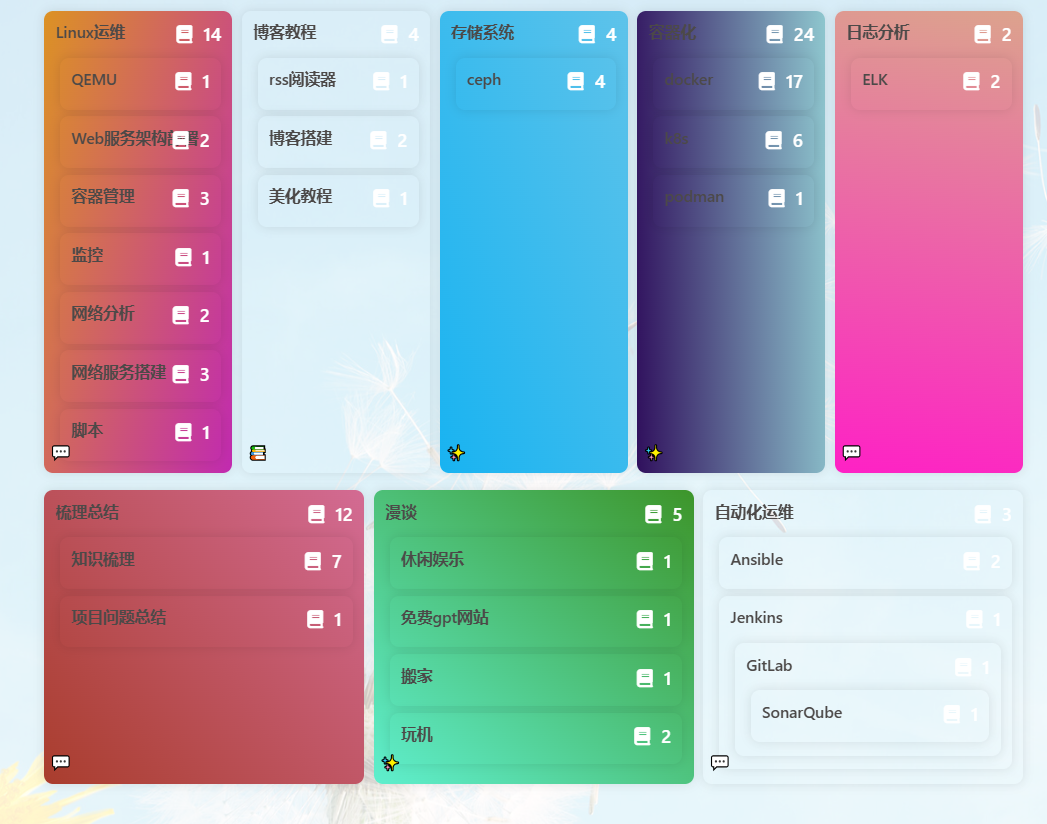
在blog\source\css的css文件中加入以下内容。
/***************************** 分类页面样式 *****************************/
#page .category-lists .category-list {
    display: flex;
    flex-wrap: wrap;
    gap: 1%; /* 设置分类项之间的间距 */
}

#page .category-lists .category-list .category-list-item {
    flex: 1 0 calc(20% - 1%); /* 初始宽度为每行五个,减去间距 */
    margin-bottom: 1%; /* 底部间距 */
    font-weight: 600;
    border-radius: 8px;
    box-shadow: 0 0 10px rgba(0, 0, 0, 0.1); /* 添加阴影效果 */
    padding: 10px; /* 内边距 */
}

@media (max-width: 1024px) {
    #page .category-lists .category-list .category-list-item {
        flex-basis: calc(33.33% - 1%); /* 在较小屏幕下,每行三个 */
    }
}

@media (max-width: 768px) {
    #page .category-lists .category-list .category-list-item {
        flex-basis: calc(50% - 1%); /* 在更小屏幕下,每行两个 */
    }
}

@media (max-width: 480px) {
    #page .category-lists .category-list .category-list-item {
        flex-basis: 100%; /* 在最小屏幕下,每行一个 */
    }
}
#page .category-lists .category-list .category-list-item .category-list-link::after {
    content: "";
    position: relative;
    width: 0;
    bottom: 0;
    display: block;
    height: 3px;
    border-radius: 3px;
    background: #fff; /* 为category-list-link添加hover效果的下划线 */
}

#page .category-lists .category-list .category-list-item .category-list-link:hover::after {
    width: 60%;
    left: 1%;
    transition: all 0.6s; /* 添加下划线展开的过渡效果 */
}

#page .list-beauty li:before, .category-lists ul li:before {
    border: #49b6f500;
}
#page .category-lists .category-list .category-list-item {
    position: relative; /* 相对定位,以便子元素可以使用绝对定位 */
    padding-top: 5px; /* 调整分类项顶部内边距,以容纳图标和数量 */
}

#page .category-lists .category-list .category-list-item .category-list-count {
    position: absolute; /* 绝对定位 */
    top: 0;
    right: 0; /* 放置在右上角 */
    color: #fff;
    font-size: 1rem;
    padding: 5px 10px; /* 调整内边距 */
    display: flex; /* 使用 Flexbox 布局 */
    align-items: center; /* 垂直居中对齐 */
}

#page .category-lists .category-list .category-list-item .category-list-count::before {
    content: "\f02d"; /* Font Awesome 6 Free 的图标 */
    padding-right: 10px; /* 调整图标与文章数量之间的距离 */
    font-family: "Font Awesome 6 Free"; /* 使用 Font Awesome 6 Free 的字体 */
}
#page .category-lists .category-list .category-list-count:after {
  content: '';
}

/* 新增样式用于图标显示 */
#page .category-lists .category-list .category-list-item .category-list-icon {
    position: absolute;
    bottom: 0;
    left: 0;
    padding: 5px; /* 调整图标与内容之间的水平距离 */
}

#post #article-container.post-content h1,
#post #article-container.post-content h2,
#post #article-container.post-content h3,
#post #article-container.post-content h4,
#post #article-container.post-content h5,
#post #article-container.post-content h6 {
  padding-left: 0 !important;
}

#post #article-container.post-content h1::before,
#post #article-container.post-content h2::before,
#post #article-container.post-content h3::before,
#post #article-container.post-content h4::before,
#post #article-container.post-content h5::before,
#post #article-container.post-content h6::before {
  position: relative;
  content: attr(data-toc) ' ';
  display: inline;
  font-family: inherit;
  font-size: inherit;
  line-height: inherit;
  margin-left: 0;
}
/***************************** 分类页面样式 *****************************/在blog\source\js的js文件中加入以下内容。
/*************************分类页面美化*************************/
// 获取所有类别列表项
const categoryItems = document.querySelectorAll('.category-list-item');

// 为每个类别列表项生成随机颜色渐变背景和图标
categoryItems.forEach((item, index) => {
    // 为每个类别列表项创建随机颜色渐变背景
    function randomBgImg() {
        const deg = Math.floor(Math.random() * 360);
        const randomBg = `linear-gradient(${deg}deg, #${Math.floor(Math.random()*16777215).toString(16)} 0%, #${Math.floor(Math.random()*16777215).toString(16)} 100%)`;
        item.style.backgroundImage = randomBg;
    }

    // 生成随机图标(这里使用了 Font Awesome 图标库)
    const icons = ['📑', '📚', '🦋', '💻', '💬', '✨']; // 可以根据需要添加更多图标
    const randomIcon = icons[Math.floor(Math.random() * icons.length)];

    // 更新类别列表项的 HTML 内容,设置背景和图标
    item.innerHTML = `
    <div>${item.innerHTML}</div>
    <div class="category-list-icon">${randomIcon}</div>`;

    // 调用随机颜色渐变背景函数
    randomBgImg();
});

function postAddToc() {
  const postContent = document.querySelector('#post > #article-container.post-content');
  const cardToc = document.getElementById('card-toc');

  if (postContent && cardToc) {
    const tocItems = cardToc.querySelectorAll('.toc-link');
    const targetElements = {};

    tocItems.forEach(tocLink => {
      const href = decodeURIComponent(tocLink.getAttribute('href').slice(1));
      const targetElement = document.getElementById(href);
      const tocNumber = tocLink.querySelector('.toc-number').textContent;

      if (targetElement) {
        targetElements[href] = { element: targetElement, tocNumber };
      }
    });

    // 设置 dataset.toc 属性
    Object.entries(targetElements).forEach(([href, { element, tocNumber }]) => {
      element.dataset.toc = tocNumber;
    });
  }
}

postAddToc();
分类美化参考原链接如下:
友链魔改
在blog\source\css的css文件中加入以下内容。
.flink-item-icon {
  margin-right: 0 !important;
  transition: .5s !important;
}
/* 头像微调 */

#article-container .flink .flink-list>.flink-list-item::before {
  content: none;
  text-align: center; /* 文本居中 */
}
/* 去掉原来自带的before */

#article-container .flink .flink-list>.flink-list-item:hover {
  background-color: #49B1F5;
  box-shadow: 0 0 10px rgba(0, 0, 0, .3);
  transition: 0.5s;
}
/* 鼠标经过改变背景 */

#article-container .flink .flink-list>.flink-list-item:hover a {
  color: white !important;
}
/* 鼠标经过改变文字颜色 */

#article-container .flink .flink-list>.flink-list-item:hover .flink-item-icon {
  width: 30px;
  margin-left: -50px;
  -webkit-transform: rotate(-180deg);
  -moz-transform: rotate(-180deg);
  -o-transform: rotate(-180deg);
  -ms-transform: rotate(-180deg);
  transform: rotate(-180deg);
}
@media screen and (max-width: 900px){
  #article-container .flink .flink-list>.flink-list-item:hover .flink-item-icon {
    width: 90px;
    height: 90px;
    border-radius: 20px;
    -webkit-transform: rotate(0deg);
    -moz-transform: rotate(0deg);
    -o-transform: rotate(0deg);
    -ms-transform: rotate(0deg);
    transform: rotate(0deg);
  }
  #article-container .flink .flink-list>.flink-list-item:hover .flink-item-tag {
    display: none;
  }
}
/* 鼠标经过头像滚动 */

#article-container .flink .flink-list > .flink-list-item a .flink-item-icon {
  width: 40px;
  height: 40px;
  border-radius: 20px;
  margin: 20px 0px 0px 0px;
}
#article-container .flink .flink-list > .flink-list-item a {
  display: block;
  height: 100%;
}
#article-container .flink .flink-item-name {
  text-align: start;
  padding: 20px 5px 5px 5px;
  height: auto;
}
#article-container .flink .flink-item-desc {
  text-align: start;
  padding: 10px 12px 0;
  height: auto;
}
.flink-item-tag {
  position: absolute;
  top: 12px;
  right: 12px;
  padding: 2px 6px;
  color: var(--icat-white);
  z-index: 1;
  border-radius: 6px;
  -webkit-transition: .3s;
  -moz-transition: .3s;
  -o-transition: .3s;
  -ms-transition: .3s;
  transition: 0.3s;
  font-size: 0.6rem;
  opacity: .8;
}
/* 友联推荐Tag */

/* PC端友联页样式 */

#article-container .flink > h2 {
  margin: 20px 7px 0;
}
#article-container .flink .flink-desc {
  margin: 0 7px;
  color: var(--icat-secondtext);
}
#article-container .flink .flink-list {
  padding: 10px 0 0;
}
#article-container .flink .flink-list > .flink-list-item {
  border: 1px solid #63a8de;
  background: var(--icat-card-bg);
  height: 80px;
  margin: 8px 8px;
  width: calc(100% / 5 - 16px);
}
@media screen and (max-width: 900px){
  #article-container .flink .flink-list > .flink-list-item {
    height: 110px;
  }
  #article-container .flink .flink-list > .flink-list-item {
    border: 2px solid var(--icat-secondbg) !important;
  }
  #article-container .flink .flink-list {
    padding: 10px 0 0;
  }
  #article-container .flink .flink-list > .flink-list-item {
    margin: 6px 6px;
    width: calc(50% - 12px) !important;
  }
  #article-container .flink > h2 {
    margin: 20px 12px 0;
  }
  #article-container .flink .flink-desc {
    margin: 0 12px;
  }
  #article-container .flink .flink-item-name {
    font-size: 1.1rem;
    padding: 30px 12px 0;
  }
  #article-container .flink .flink-list > .flink-list-item a .flink-item-icon {
    position: absolute;
    bottom: -30%;
    right: 0;
    float: right;
    width: 100px;
    height: 100px;
    -webkit-transform: translate(35%,30%);
    -moz-transform: translate(35%,30%);
    -o-transform: translate(35%,30%);
    -ms-transform: translate(35%,30%);
    transform: translate(35%,30%);
    margin-top: -12px;
    margin-left: -12px;
    border-radius: 26px;
    opacity: .2;
  }
  .flink-item-tag {
    top: 8px;
    right: 8px;
  }
}
友链美化参考原链接如下:

侧边栏标签
在blog\source\css的css文件中加入以下内容。
/*侧边栏标签美化*/
#aside-content .card-tag-cloud a {
  font-size: 0.3rem;
  border-radius: 6px;
  border-style: dashed;
  border-width: 1px;
  margin: 3px;
}
标签页标签
/* 标签页加新样式 */
#aside-content .card-tag-cloud a {
    border: 1px solid;
    line-height: 1.5;
    border-radius: 6px;
    margin: 3px;
    padding: 0 5px;
}

.tag-cloud-list a {
    border: 1px solid;
    line-height: 1.5;
    border-radius: 6px;
    padding: 5px 15px;
    font-size: 1.2rem;
    margin: 5px;
}
文章分页卡片
在blog\source\css的css文件中加入以下内容。
/*文章分页卡片美化*/
.relatedPosts > .relatedPosts-list > div {
  border-radius: 20px;
  border-style: dashed;
  border-width: 1px;
  margin: 1px;
}
.relatedPosts > .relatedPosts-list > a {
    margin: 3px;
    height: 200px;
    border-radius: 20px;
}
文章相关推荐卡片
在blog\source\css的css文件中加入以下内容。
/*文章相关推荐卡片美化*/
.relatedPosts > .relatedPosts-list > div {
  border-radius: 20px;
  border-style: dashed;
  border-width: 1px;
  margin: 1px;
}
文章目录
在blog\source\css的css文件中加入以下内容。
/* 文章目录 */
 #aside-content #card-toc .toc-content {
  margin: 10px -18px;
}
 #aside-content #card-toc .toc-content .toc-link.active {
  line-height: 1.2;
  border-radius: 12px;
  border-left-color: var(--heo-hovertext);
  background-color: var(--heo-card-bg);
  color: var(--heo-lighttext);
  font-weight: bold;
  font-size: 20px;
}
[data-theme=dark].toc .toc-item.active .toc-link .toc-text {
  color: var(--heo-white);
}
#aside-content #card-toc .toc-content .toc-item.active .toc-link {
  opacity: 1;
  border-radius: 8px;
}
#aside-content #card-toc .toc-content .toc-link {
  line-height: 1.2;
  padding: 8px;
  border-left: 0px solid transparent;
  border-radius: 12px;
  color: var(--heo-secondtext);
  cursor: default;
}
#aside-content #card-toc .toc-content .toc-link:not(.active) span {
  opacity: 0.6;
  cursor: pointer;
  filter: blur(1px);
  transition: 0.3s;
}
#aside-content #card-toc:hover .toc-content .toc-link:not(.active) span {
  filter: blur(0px);
  opacity: 1;
}
#aside-content #card-toc .toc-content .toc-link:not(.active) span:hover {
  color: var(--heo-lighttext);
}
版权信息
在blog\source\css的css文件中加入以下内容。
/* **********************版权信息 ********************** */
/* 背景 */
#post .post-copyright {
  background: var(--heo-card-bg);
  padding: 2rem 1.3rem;
  overflow: hidden;
  border: var(--style-border);
  border-width: 1px;
  transition: 0.3s;
  border-radius: 11px;
}


@media screen and (max-width: 768px) {
  #post .post-copyright {
    padding: 1rem 1.3rem;
  }
}

.post-copyright__author {
  display: flex;
  align-items: center;
}

.post-copyright__original {
  background: var(--heo-fontcolor);
  color: var(--heo-card-bg);
  padding: 0.2rem 0.5rem;
  font-size: 0.7rem;
  border-radius: 8px;
  margin-right: 0.5rem;
  font-weight: bold;
  line-height: 1.5;
  white-space: nowrap;
}

.post-copyright__original:hover {
  background: var(--heo-main);
  color: var(--heo-white);
}

@media screen and (max-width: 768px) {
  #post .post-copyright {
    box-shadow: var(--heo-shadow-border);
  }

  .post-copyright .post-meta-original {
    display: none;
  }

  .post-copyright__original {
    display: none;
  }

  #post .post-copyright:after {
    display: none;
  }
}


/* 链接 */
#post>div.post-copyright>div.post-copyright__type {
  line-height: 16px;
  display: flex;
  margin-top: 8px;
}

#post>div.post-copyright>div.post-copyright__type>span>a {
  font-size: 14px;
  opacity: 0.6;
  line-height: 16px;
}

#post>div.post-copyright>div.post-copyright__type>span>a:hover {
  opacity: 1;
  background: none;
}

#post-copyright-url a {
  overflow: hidden;
  display: -webkit-box;
  -webkit-line-clamp: 1;
  -webkit-box-orient: vertical;
}

/*装饰圈*/
#post .post-copyright:before {
  display: none;
}

#post .post-copyright .post-copyright-meta {
    color: #5a7ed7;
    font-weight: bold;
}
#post .post-copyright {
    padding: 2rem 1.3rem;
    border-radius: 11px;
    border-style: dashed;
}
/* **********************版权信息 ********************** */
外挂标签Tab组件
在blog\source\css的css文件中加入以下内容。
/*外挂标签tab*/
#article-container .tabs {
    position: relative;
    margin: 0 0 20px;
    border-radius: 5px;
    border-right: 1px solid var(--tab-border-color);
    border-bottom: 1px solid var(--tab-border-color);
    border-left: 1px solid var(--tab-border-color);
}

#article-container .tabs > .nav-tabs > .tab {
  -webkit-box-flex: 1;
  -moz-box-flex: 1;
  -o-box-flex: 1;
  -ms-box-flex: 1;
  box-flex: 1;
  -webkit-flex-grow: 1;
  flex-grow: 1;
  border-radius: 5px;
  padding: 8px 18px;
  border-top: 2px solid rgba(0,0,0,0);
  background: #fff;
  color: var(--tab-botton-color);
  line-height: 2;
  -webkit-transition: all 0.4s;
  -moz-transition: all 0.4s;
  -o-transition: all 0.4s;
  -ms-transition: all 0.4s;
  transition: all 0.4s;
}
[data-theme="dark"] #article-container .tabs > .nav-tabs > .tab {
  -webkit-box-flex: 1;
  -moz-box-flex: 1;
  -o-box-flex: 1;
  -ms-box-flex: 1;
  box-flex: 1;
  -webkit-flex-grow: 1;
  flex-grow: 1;
  border-radius: 5px;
  padding: 8px 18px;
  border-top: 2px solid rgba(0,0,0,0);
  background: rgba(0,0,0,0);
  color: var(--tab-botton-color);
  line-height: 2;
  -webkit-transition: all 0.4s;
  -moz-transition: all 0.4s;
  -o-transition: all 0.4s;
  -ms-transition: all 0.4s;
  transition: all 0.4s;
}
#article-container .tabs > .nav-tabs > .tab.active {
    border-top: 2px solid #49b1f5;
    background: var(--tab-button-active-bg);
    cursor: default;
}
[data-theme="dark"] #article-container .tabs > .nav-tabs > .tab.active {
    border-top: 2px solid #49b1f5;
    background: var(--tab-button-active-bg);
    cursor: default;
}
页脚透明
INFO
2025-10-13 更新记录:修复页脚文字明暗模式下显示问题。
在blog\source\css的css文件中加入以下内容。
/*页脚透明化*/
#footer, #footer:before {
    background: transparent!important;
}
#footer-wrap,
#footer-wrap a {
  color: #111;
  -webkit-transition: unset;
  -moz-transition: unset;
  -o-transition: unset;
  -ms-transition: unset;
  transition: unset;
}
#footer .footer-other {
    color: #655f5f;
}
[data-theme='dark'] #footer .footer-other {
    color: #BDBEC0;
}
[data-theme='dark'] #footer-wrap,
[data-theme='dark'] #footer-wrap a {
  color: var(--light-grey);
}
文章顶图透明化
在blog\source\css的css文件中加入以下内容。
/* 文章顶图透明化 */
#page-header {
    background: rgba(0,0,0,.5) !important;
}
#page-header::before {
  background: transparent !important;
}
[data-theme="dark"] #page-header::before {
  background: transparent !important;
}
标签云文章计数
在blog\themes\butterfly\scripts\helpers\page.js文件中,修改内容。
-    return `<a href="${env.url_for(tag.path)}" style="${style}">${tag.name}</a>`
+	 return  `<a href="${env.url_for(tag.path)}" style="${style}">${tag.name}<sup>${tag.length}</sup></a>`
实现参考原链接如下:
直达底部按钮
在blog\themes\butterfly\layout\includes\rightside.pug文件中,i.fas.fa-arrow-up下面添加以下两行内容。
    button#go-up(type="button" title=_p("rightside.back_to_top"))
      span.scroll-percent
      i.fas.fa-arrow-up
+    button#go-down(type="button" title="直达底部" onclick="btf.scrollToDest(document.body.scrollHeight, 500)")
+      i.fas.fa-arrow-down
节日弹窗与公祭日变灰
在blog\source\js目录下,创建day.js文件,加入以下内容。
var d = new Date();
m = d.getMonth() + 1;
dd = d.getDate();
y = d.getFullYear();
// 公祭日
if (m == 9 && dd == 18) {
document.getElementsByTagName("html")[0].setAttribute("style", "filter: grayscale(60%);");
if (sessionStorage.getItem("isPopupWindow") != "1") {
Swal.fire("今天是九一八事变" + (y - 1931).toString() + "周年纪念日\n🪔勿忘国耻,振兴中华🪔");
sessionStorage.setItem("isPopupWindow", "1");
}
}
if (m == 7 && dd == 7) {
document.getElementsByTagName("html")[0].setAttribute("style", "filter: grayscale(60%);");
if (sessionStorage.getItem("isPopupWindow") != "1") {
Swal.fire("今天是卢沟桥事变" + (y - 1937).toString() + "周年纪念日\n🪔勿忘国耻,振兴中华🪔");
sessionStorage.setItem("isPopupWindow", "1");
}
}
if (m == 12 && dd == 13) {
document.getElementsByTagName("html")[0].setAttribute("style", "filter: grayscale(60%);");
if (sessionStorage.getItem("isPopupWindow") != "1") {
Swal.fire("今天是南京大屠杀" + (y - 1937).toString() + "周年纪念日\n🪔勿忘国耻,振兴中华🪔");
sessionStorage.setItem("isPopupWindow", "1");
}
}
if (m == 8 && dd == 14) {
document.getElementsByTagName("html")[0].setAttribute("style", "filter: grayscale(60%);");
if (sessionStorage.getItem("isPopupWindow") != "1") {
Swal.fire("今天是世界慰安妇纪念日\n🪔勿忘国耻,振兴中华🪔");
sessionStorage.setItem("isPopupWindow", "1");
}
}
// 节假日
if (m == 10 && dd <= 3) {//国庆节
if (sessionStorage.getItem("isPopupWindow") != "1") {
Swal.fire("国庆节,祝伟大祖国" + (y - 1949).toString() + "岁生日快乐!");
sessionStorage.setItem("isPopupWindow", "1");
}
}
if (m == 8 && dd == 15) {//搞来玩的,小日子投降
if (sessionStorage.getItem("isPopupWindow") != "1") {
Swal.fire("小日子已经投降" + (y - 1945).toString() + "年了😃");
sessionStorage.setItem("isPopupWindow", "1");
}
}
if (m == 1 && dd == 1) {//元旦节
if (sessionStorage.getItem("isPopupWindow") != "1") {
Swal.fire(y.toString() + "年元旦快乐!🎉");
sessionStorage.setItem("isPopupWindow", "1");
}
}
if (m == 3 && dd == 8) {//妇女节
if (sessionStorage.getItem("isPopupWindow") != "1") {
Swal.fire("各位女神们,妇女节快乐!👩");
sessionStorage.setItem("isPopupWindow", "1");
}
}
l = ["非常抱歉,因为不可控原因,博客将于明天停止运营!", "好消息,日本没了!", "美国垮了,原因竟然是川普!", "微软垮了!", "你的电脑已经过载,建议立即关机!", "你知道吗?站长很喜欢你哦!", "一分钟有61秒哦", "你喜欢的人跟别人跑了!"]
if (m == 4 && dd == 1) {//愚人节,随机谎话
if (sessionStorage.getItem("isPopupWindow") != "1") {
// 显示第一个弹窗
Swal.fire(l[Math.floor(Math.random() * l.length)]).then(() => {
// 第一个弹窗关闭后,显示第二个弹窗
Swal.fire("别当真啦,今天是愚人节😝!");
// 设置第二个弹窗的显示标志
sessionStorage.setItem("isPopupWindow", "1");
});
// 设置第一个弹窗的显示标志
sessionStorage.setItem("isPopupWindow", "1");
}
}
if (m == 5 && dd == 1) {//劳动节
if (sessionStorage.getItem("isPopupWindow") != "1") {
Swal.fire("劳动节快乐\n为各行各业辛勤工作的人们致敬!");
sessionStorage.setItem("isPopupWindow", "1");
}
}
if (m == 5 && dd == 4) {//青年节
if (sessionStorage.getItem("isPopupWindow") != "1") {
Swal.fire("青年节快乐\n青春不是回忆逝去,而是把握现在!");
sessionStorage.setItem("isPopupWindow", "1");
}
}
if (m == 5 && dd == 20) {//520
if (sessionStorage.getItem("isPopupWindow") != "1") {
Swal.fire("今年是520情人节\n快和你喜欢的人一起过吧!💑");
sessionStorage.setItem("isPopupWindow", "1");
}
}
if (m == 7 && dd == 1) {//建党节
if (sessionStorage.getItem("isPopupWindow") != "1") {
Swal.fire("建党节,祝中国共产党" + (y - 1921).toString() + "岁生日快乐!");
sessionStorage.setItem("isPopupWindow", "1");
}
}
if (m == 9 && dd == 10) {//教师节
if (sessionStorage.getItem("isPopupWindow") != "1") {
Swal.fire("各位老师们教师节快乐!👩🏫");
sessionStorage.setItem("isPopupWindow", "1");
}
}
//传统节日部分
if ( m == 4 && dd == 4)) {//清明节
if (sessionStorage.getItem("isPopupWindow") != "1") {
Swal.fire("清明时节雨纷纷,一束鲜花祭故人💐");
sessionStorage.setItem("isPopupWindow", "1");
}
}
if ( m == 12 && dd == 21)) {//冬至
if (sessionStorage.getItem("isPopupWindow") != "1") {
Swal.fire("冬至快乐\n快吃上一碗热热的汤圆和饺子吧🧆");
sessionStorage.setItem("isPopupWindow", "1");
}
}
var lunar = calendarFormatter.solar2lunar();
//农历采用汉字计算,防止出现闰月导致问题
if ((lunar["IMonthCn"] == "正月" && lunar["IDayCn"] == "初六") || (lunar["IMonthCn"] == "正月" && lunar["IDayCn"] == "初五") || (lunar["IMonthCn"] == "正月" && lunar["IDayCn"] == "初四") || (lunar["IMonthCn"] == "正月" && lunar["IDayCn"] == "初三") || (lunar["IMonthCn"] == "正月" && lunar["IDayCn"] == "初二") || (lunar["IMonthCn"] == "正月" && lunar["IDayCn"] == "初一") || (lunar["IMonthCn"] == "腊月" && lunar["IDayCn"] == "三十") || (lunar["IMonthCn"] == "腊月" && lunar["IDayCn"] == "廿九")) {
//春节,本来只有大年三十到初六,但是有时候除夕是大年二十九,所以也加上了
if (sessionStorage.getItem("isPopupWindow") != "1") {
Swal.fire(y.toString() + "年新年快乐\n🎊祝你心想事成,诸事顺利🎊");
sessionStorage.setItem("isPopupWindow", "1");
}
}
if ((lunar["IMonthCn"] == "正月" && lunar["IDayCn"] == "十五")) {
//元宵节
if (sessionStorage.getItem("isPopupWindow") != "1") {
Swal.fire("元宵节快乐\n送你一个大大的灯笼🧅");
sessionStorage.setItem("isPopupWindow", "1");
}
}
if ((lunar["IMonthCn"] == "五月" && lunar["IDayCn"] == "初五")) {
//端午节
if (sessionStorage.getItem("isPopupWindow") != "1") {
Swal.fire("端午节快乐\n请你吃一条粽子🍙");
sessionStorage.setItem("isPopupWindow", "1");
}
}
if ((lunar["IMonthCn"] == "七月" && lunar["IDayCn"] == "初七")) {
//七夕节
if (sessionStorage.getItem("isPopupWindow") != "1") {
Swal.fire("七夕节快乐\n黄昏后,柳梢头,牛郎织女来碰头");
sessionStorage.setItem("isPopupWindow", "1");
}
}
if ((lunar["IMonthCn"] == "八月" && lunar["IDayCn"] == "十五")) {
//中秋节
if (sessionStorage.getItem("isPopupWindow") != "1") {
Swal.fire("中秋节快乐\n请你吃一块月饼🍪");
sessionStorage.setItem("isPopupWindow", "1");
}
}
if ((lunar["IMonthCn"] == "九月" && lunar["IDayCn"] == "初九")) {
//重阳节
if (sessionStorage.getItem("isPopupWindow") != "1") {
Swal.fire("重阳节快乐\n独在异乡为异客,每逢佳节倍思亲");
sessionStorage.setItem("isPopupWindow", "1");
}
}
// 切换主题提醒
// if (y == 2022 && m == 12 && (dd >= 18 && dd <= 20)) {
// if (sessionStorage.getItem("isPopupWindow") != "1") {
// Swal.fire("网站换成冬日限定主题啦⛄");
// sessionStorage.setItem("isPopupWindow", "1");
// }
// }在blog\source\js目录下,创建lunar.js文件,加入以下内容。
var lunarInfo = [19416, 19168, 42352, 21717, 53856, 55632, 91476, 22176, 39632, 21970, 19168, 42422, 42192, 53840, 119381, 46400, 54944, 44450, 38320, 84343, 18800, 42160, 46261, 27216, 27968, 109396, 11104, 38256, 21234, 18800, 25958, 54432, 59984, 28309, 23248, 11104, 100067, 37600, 116951, 51536, 54432, 120998, 46416, 22176, 107956, 9680, 37584, 53938, 43344, 46423, 27808, 46416, 86869, 19872, 42416, 83315, 21168, 43432, 59728, 27296, 44710, 43856, 19296, 43748, 42352, 21088, 62051, 55632, 23383, 22176, 38608, 19925, 19152, 42192, 54484, 53840, 54616, 46400, 46752, 103846, 38320, 18864, 43380, 42160, 45690, 27216, 27968, 44870, 43872, 38256, 19189, 18800, 25776, 29859, 59984, 27480, 23232, 43872, 38613, 37600, 51552, 55636, 54432, 55888, 30034, 22176, 43959, 9680, 37584, 51893, 43344, 46240, 47780, 44368, 21977, 19360, 42416, 86390, 21168, 43312, 31060, 27296, 44368, 23378, 19296, 42726, 42208, 53856, 60005, 54576, 23200, 30371, 38608, 19195, 19152, 42192, 118966, 53840, 54560, 56645, 46496, 22224, 21938, 18864, 42359, 42160, 43600, 111189, 27936, 44448, 84835, 37744, 18936, 18800, 25776, 92326, 59984, 27424, 108228, 43744, 41696, 53987, 51552, 54615, 54432, 55888, 23893, 22176, 42704, 21972, 21200, 43448, 43344, 46240, 46758, 44368, 21920, 43940, 42416, 21168, 45683, 26928, 29495, 27296, 44368, 84821, 19296, 42352, 21732, 53600, 59752, 54560, 55968, 92838, 22224, 19168, 43476, 41680, 53584, 62034, 54560], solarMonth = [31, 28, 31, 30, 31, 30, 31, 31, 30, 31, 30, 31], Gan = ["甲", "乙", "丙", "丁", "戊", "己", "庚", "辛", "壬", "癸"], Zhi = ["子", "丑", "寅", "卯", "辰", "巳", "午", "未", "申", "酉", "戌", "亥"], Animals = ["鼠", "牛", "虎", "兔", "龙", "蛇", "马", "羊", "猴", "鸡", "狗", "猪"], solarTerm = ["小寒", "大寒", "立春", "雨水", "惊蛰", "春分", "清明", "谷雨", "立夏", "小满", "芒种", "夏至", "小暑", "大暑", "立秋", "处暑", "白露", "秋分", "寒露", "霜降", "立冬", "小雪", "大雪", "冬至"], sTermInfo = ["9778397bd097c36b0b6fc9274c91aa", "97b6b97bd19801ec9210c965cc920e", "97bcf97c3598082c95f8c965cc920f", "97bd0b06bdb0722c965ce1cfcc920f", "b027097bd097c36b0b6fc9274c91aa", "97b6b97bd19801ec9210c965cc920e", "97bcf97c359801ec95f8c965cc920f", "97bd0b06bdb0722c965ce1cfcc920f", "b027097bd097c36b0b6fc9274c91aa", "97b6b97bd19801ec9210c965cc920e", "97bcf97c359801ec95f8c965cc920f", "97bd0b06bdb0722c965ce1cfcc920f", "b027097bd097c36b0b6fc9274c91aa", "9778397bd19801ec9210c965cc920e", "97b6b97bd19801ec95f8c965cc920f", "97bd09801d98082c95f8e1cfcc920f", "97bd097bd097c36b0b6fc9210c8dc2", "9778397bd197c36c9210c9274c91aa", "97b6b97bd19801ec95f8c965cc920e", "97bd09801d98082c95f8e1cfcc920f", "97bd097bd097c36b0b6fc9210c8dc2", "9778397bd097c36c9210c9274c91aa", "97b6b97bd19801ec95f8c965cc920e", "97bcf97c3598082c95f8e1cfcc920f", "97bd097bd097c36b0b6fc9210c8dc2", "9778397bd097c36c9210c9274c91aa", "97b6b97bd19801ec9210c965cc920e", "97bcf97c3598082c95f8c965cc920f", "97bd097bd097c35b0b6fc920fb0722", "9778397bd097c36b0b6fc9274c91aa", "97b6b97bd19801ec9210c965cc920e", "97bcf97c3598082c95f8c965cc920f", "97bd097bd097c35b0b6fc920fb0722", "9778397bd097c36b0b6fc9274c91aa", "97b6b97bd19801ec9210c965cc920e", "97bcf97c359801ec95f8c965cc920f", "97bd097bd097c35b0b6fc920fb0722", "9778397bd097c36b0b6fc9274c91aa", "97b6b97bd19801ec9210c965cc920e", "97bcf97c359801ec95f8c965cc920f", "97bd097bd097c35b0b6fc920fb0722", "9778397bd097c36b0b6fc9274c91aa", "97b6b97bd19801ec9210c965cc920e", "97bcf97c359801ec95f8c965cc920f", "97bd097bd07f595b0b6fc920fb0722", "9778397bd097c36b0b6fc9210c8dc2", "9778397bd19801ec9210c9274c920e", "97b6b97bd19801ec95f8c965cc920f", "97bd07f5307f595b0b0bc920fb0722", "7f0e397bd097c36b0b6fc9210c8dc2", "9778397bd097c36c9210c9274c920e", "97b6b97bd19801ec95f8c965cc920f", "97bd07f5307f595b0b0bc920fb0722", "7f0e397bd097c36b0b6fc9210c8dc2", "9778397bd097c36c9210c9274c91aa", "97b6b97bd19801ec9210c965cc920e", "97bd07f1487f595b0b0bc920fb0722", "7f0e397bd097c36b0b6fc9210c8dc2", "9778397bd097c36b0b6fc9274c91aa", "97b6b97bd19801ec9210c965cc920e", "97bcf7f1487f595b0b0bb0b6fb0722", "7f0e397bd097c35b0b6fc920fb0722", "9778397bd097c36b0b6fc9274c91aa", "97b6b97bd19801ec9210c965cc920e", "97bcf7f1487f595b0b0bb0b6fb0722", "7f0e397bd097c35b0b6fc920fb0722", "9778397bd097c36b0b6fc9274c91aa", "97b6b97bd19801ec9210c965cc920e", "97bcf7f1487f531b0b0bb0b6fb0722", "7f0e397bd097c35b0b6fc920fb0722", "9778397bd097c36b0b6fc9274c91aa", "97b6b97bd19801ec9210c965cc920e", "97bcf7f1487f531b0b0bb0b6fb0722", "7f0e397bd07f595b0b6fc920fb0722", "9778397bd097c36b0b6fc9274c91aa", "97b6b97bd19801ec9210c9274c920e", "97bcf7f0e47f531b0b0bb0b6fb0722", "7f0e397bd07f595b0b0bc920fb0722", "9778397bd097c36b0b6fc9210c91aa", "97b6b97bd197c36c9210c9274c920e", "97bcf7f0e47f531b0b0bb0b6fb0722", "7f0e397bd07f595b0b0bc920fb0722", "9778397bd097c36b0b6fc9210c8dc2", "9778397bd097c36c9210c9274c920e", "97b6b7f0e47f531b0723b0b6fb0722", "7f0e37f5307f595b0b0bc920fb0722", "7f0e397bd097c36b0b6fc9210c8dc2", "9778397bd097c36b0b70c9274c91aa", "97b6b7f0e47f531b0723b0b6fb0721", "7f0e37f1487f595b0b0bb0b6fb0722", "7f0e397bd097c35b0b6fc9210c8dc2", "9778397bd097c36b0b6fc9274c91aa", "97b6b7f0e47f531b0723b0b6fb0721", "7f0e27f1487f595b0b0bb0b6fb0722", "7f0e397bd097c35b0b6fc920fb0722", "9778397bd097c36b0b6fc9274c91aa", "97b6b7f0e47f531b0723b0b6fb0721", "7f0e27f1487f531b0b0bb0b6fb0722", "7f0e397bd097c35b0b6fc920fb0722", "9778397bd097c36b0b6fc9274c91aa", "97b6b7f0e47f531b0723b0b6fb0721", "7f0e27f1487f531b0b0bb0b6fb0722", "7f0e397bd097c35b0b6fc920fb0722", "9778397bd097c36b0b6fc9274c91aa", "97b6b7f0e47f531b0723b0b6fb0721", "7f0e27f1487f531b0b0bb0b6fb0722", "7f0e397bd07f595b0b0bc920fb0722", "9778397bd097c36b0b6fc9274c91aa", "97b6b7f0e47f531b0723b0787b0721", "7f0e27f0e47f531b0b0bb0b6fb0722", "7f0e397bd07f595b0b0bc920fb0722", "9778397bd097c36b0b6fc9210c91aa", "97b6b7f0e47f149b0723b0787b0721", "7f0e27f0e47f531b0723b0b6fb0722", "7f0e397bd07f595b0b0bc920fb0722", "9778397bd097c36b0b6fc9210c8dc2", "977837f0e37f149b0723b0787b0721", "7f07e7f0e47f531b0723b0b6fb0722", "7f0e37f5307f595b0b0bc920fb0722", "7f0e397bd097c35b0b6fc9210c8dc2", "977837f0e37f14998082b0787b0721", "7f07e7f0e47f531b0723b0b6fb0721", "7f0e37f1487f595b0b0bb0b6fb0722", "7f0e397bd097c35b0b6fc9210c8dc2", "977837f0e37f14998082b0787b06bd", "7f07e7f0e47f531b0723b0b6fb0721", "7f0e27f1487f531b0b0bb0b6fb0722", "7f0e397bd097c35b0b6fc920fb0722", "977837f0e37f14998082b0787b06bd", "7f07e7f0e47f531b0723b0b6fb0721", "7f0e27f1487f531b0b0bb0b6fb0722", "7f0e397bd097c35b0b6fc920fb0722", "977837f0e37f14998082b0787b06bd", "7f07e7f0e47f531b0723b0b6fb0721", "7f0e27f1487f531b0b0bb0b6fb0722", "7f0e397bd07f595b0b0bc920fb0722", "977837f0e37f14998082b0787b06bd", "7f07e7f0e47f531b0723b0b6fb0721", "7f0e27f1487f531b0b0bb0b6fb0722", "7f0e397bd07f595b0b0bc920fb0722", "977837f0e37f14998082b0787b06bd", "7f07e7f0e47f149b0723b0787b0721", "7f0e27f0e47f531b0b0bb0b6fb0722", "7f0e397bd07f595b0b0bc920fb0722", "977837f0e37f14998082b0723b06bd", "7f07e7f0e37f149b0723b0787b0721", "7f0e27f0e47f531b0723b0b6fb0722", "7f0e397bd07f595b0b0bc920fb0722", "977837f0e37f14898082b0723b02d5", "7ec967f0e37f14998082b0787b0721", "7f07e7f0e47f531b0723b0b6fb0722", "7f0e37f1487f595b0b0bb0b6fb0722", "7f0e37f0e37f14898082b0723b02d5", "7ec967f0e37f14998082b0787b0721", "7f07e7f0e47f531b0723b0b6fb0722", "7f0e37f1487f531b0b0bb0b6fb0722", "7f0e37f0e37f14898082b0723b02d5", "7ec967f0e37f14998082b0787b06bd", "7f07e7f0e47f531b0723b0b6fb0721", "7f0e37f1487f531b0b0bb0b6fb0722", "7f0e37f0e37f14898082b072297c35", "7ec967f0e37f14998082b0787b06bd", "7f07e7f0e47f531b0723b0b6fb0721", "7f0e27f1487f531b0b0bb0b6fb0722", "7f0e37f0e37f14898082b072297c35", "7ec967f0e37f14998082b0787b06bd", "7f07e7f0e47f531b0723b0b6fb0721", "7f0e27f1487f531b0b0bb0b6fb0722", "7f0e37f0e366aa89801eb072297c35", "7ec967f0e37f14998082b0787b06bd", "7f07e7f0e47f149b0723b0787b0721", "7f0e27f1487f531b0b0bb0b6fb0722", "7f0e37f0e366aa89801eb072297c35", "7ec967f0e37f14998082b0723b06bd", "7f07e7f0e47f149b0723b0787b0721", "7f0e27f0e47f531b0723b0b6fb0722", "7f0e37f0e366aa89801eb072297c35", "7ec967f0e37f14998082b0723b06bd", "7f07e7f0e37f14998083b0787b0721", "7f0e27f0e47f531b0723b0b6fb0722", "7f0e37f0e366aa89801eb072297c35", "7ec967f0e37f14898082b0723b02d5", "7f07e7f0e37f14998082b0787b0721", "7f07e7f0e47f531b0723b0b6fb0722", "7f0e36665b66aa89801e9808297c35", "665f67f0e37f14898082b0723b02d5", "7ec967f0e37f14998082b0787b0721", "7f07e7f0e47f531b0723b0b6fb0722", "7f0e36665b66a449801e9808297c35", "665f67f0e37f14898082b0723b02d5", "7ec967f0e37f14998082b0787b06bd", "7f07e7f0e47f531b0723b0b6fb0721", "7f0e36665b66a449801e9808297c35", "665f67f0e37f14898082b072297c35", "7ec967f0e37f14998082b0787b06bd", "7f07e7f0e47f531b0723b0b6fb0721", "7f0e26665b66a449801e9808297c35", "665f67f0e37f1489801eb072297c35", "7ec967f0e37f14998082b0787b06bd", "7f07e7f0e47f531b0723b0b6fb0721", "7f0e27f1487f531b0b0bb0b6fb0722"], nStr1 = ["日", "一", "二", "三", "四", "五", "六", "七", "八", "九", "十"], nStr2 = ["初", "十", "廿", "卅"], nStr3 = ["正", "二", "三", "四", "五", "六", "七", "八", "九", "十", "冬", "腊"];
function lYearDays(b) {
    var f,
    c = 348;
    for (f = 32768; f > 8; f >>= 1)
        c += lunarInfo[b - 1900] & f ? 1 : 0;
    return c + leapDays(b)
}
function leapMonth(b) {
    return 15 & lunarInfo[b - 1900]
}
function leapDays(b) {
    return leapMonth(b) ? 65536 & lunarInfo[b - 1900] ? 30 : 29 : 0
}
function monthDays(b, f) {
    return f > 12 || f < 1 ? -1 : lunarInfo[b - 1900] & 65536 >> f ? 30 : 29
}
function solarDays(b, f) {
    if (f > 12 || f < 1)
        return -1;
    var c = f - 1;
    return 1 === c ? b % 4 == 0 && b % 100 != 0 || b % 400 == 0 ? 29 : 28 : solarMonth[c]
}
function toGanZhiYear(b) {
    var f = (b - 3) % 10,
    c = (b - 3) % 12;
    return 0 === f && (f = 10),
    0 === c && (c = 12),
    Gan[f - 1] + Zhi[c - 1]
}
function toAstro(b, f) {
    return "魔羯水瓶双鱼白羊金牛双子巨蟹狮子处女天秤天蝎射手魔羯".substr(2 * b - (f < [20, 19, 21, 21, 21, 22, 23, 23, 23, 23, 22, 22][b - 1] ? 2 : 0), 2) + "座"
}
function toGanZhi(b) {
    return Gan[b % 10] + Zhi[b % 12]
}
function getTerm(b, f) {
    if (b < 1900 || b > 2100)
        return -1;
    if (f < 1 || f > 24)
        return -1;
    var c = sTermInfo[b - 1900],
    e = [parseInt("0x" + c.substr(0, 5)).toString(), parseInt("0x" + c.substr(5, 5)).toString(), parseInt("0x" + c.substr(10, 5)).toString(), parseInt("0x" + c.substr(15, 5)).toString(), parseInt("0x" + c.substr(20, 5)).toString(), parseInt("0x" + c.substr(25, 5)).toString()],
    a = [e[0].substr(0, 1), e[0].substr(1, 2), e[0].substr(3, 1), e[0].substr(4, 2), e[1].substr(0, 1), e[1].substr(1, 2), e[1].substr(3, 1), e[1].substr(4, 2), e[2].substr(0, 1), e[2].substr(1, 2), e[2].substr(3, 1), e[2].substr(4, 2), e[3].substr(0, 1), e[3].substr(1, 2), e[3].substr(3, 1), e[3].substr(4, 2), e[4].substr(0, 1), e[4].substr(1, 2), e[4].substr(3, 1), e[4].substr(4, 2), e[5].substr(0, 1), e[5].substr(1, 2), e[5].substr(3, 1), e[5].substr(4, 2)];
    return parseInt(a[f - 1])
}
function toChinaMonth(b) {
    if (b > 12 || b < 1)
        return -1;
    var f = nStr3[b - 1];
    return f += "月"
}
function toChinaDay(b) {
    var f;
    switch (b) {
    case 10:
        f = "初十";
        break;
    case 20:
        f = "二十";
        break;
    case 30:
        f = "三十";
        break;
    default:
        f = nStr2[Math.floor(b / 10)],
        f += nStr1[b % 10]
    }
    return f
}
function getAnimal(b) {
    return Animals[(b - 4) % 12]
}
function solar2lunar(b, f, c) {
    if (b < 1900 || b > 2100)
        return -1;
    if (1900 === b && 1 === f && c < 31)
        return -1;
    var e,
    a,
    r = null,
    t = 0;
    b = (r = b ? new Date(b, parseInt(f) - 1, c) : new Date).getFullYear(),
    f = r.getMonth() + 1,
    c = r.getDate();
    var d = (Date.UTC(r.getFullYear(), r.getMonth(), r.getDate()) - Date.UTC(1900, 0, 31)) / 864e5;
    for (e = 1900; e < 2101 && d > 0; e++)
        d -= t = lYearDays(e);
    d < 0 && (d += t, e--);
    var n = new Date,
    s = !1;
    n.getFullYear() === b && n.getMonth() + 1 === f && n.getDate() === c && (s = !0);
    var u = r.getDay(),
    o = nStr1[u];
    0 === u && (u = 7);
    var l = e;
    a = leapMonth(e);
    var i = !1;
    for (e = 1; e < 13 && d > 0; e++)
        a > 0 && e === a + 1 && !1 === i ? (--e, i = !0, t = leapDays(l)) : t = monthDays(l, e), !0 === i && e === a + 1 && (i = !1), d -= t;
    0 === d && a > 0 && e === a + 1 && (i ? i = !1 : (i = !0, --e)),
    d < 0 && (d += t, --e);
    var h = e,
    D = d + 1,
    g = f - 1,
    v = toGanZhiYear(l),
    y = getTerm(b, 2 * f - 1),
    m = getTerm(b, 2 * f),
    p = toGanZhi(12 * (b - 1900) + f + 11);
    c >= y && (p = toGanZhi(12 * (b - 1900) + f + 12));
    var M = !1,
    T = null;
    y === c && (M = !0, T = solarTerm[2 * f - 2]),
    m === c && (M = !0, T = solarTerm[2 * f - 1]);
    var I = toGanZhi(Date.UTC(b, g, 1, 0, 0, 0, 0) / 864e5 + 25567 + 10 + c - 1),
    C = toAstro(f, c);
    return {
        lYear: l,
        lMonth: h,
        lDay: D,
        Animal: getAnimal(l),
        IMonthCn: (i ? "闰" : "") + toChinaMonth(h),
        IDayCn: toChinaDay(D),
        cYear: b,
        cMonth: f,
        cDay: c,
        gzYear: v,
        gzMonth: p,
        gzDay: I,
        isToday: s,
        isLeap: i,
        nWeek: u,
        ncWeek: "星期" + o,
        isTerm: M,
        Term: T,
        astro: C
    }
}
var calendarFormatter = {
    solar2lunar: function (b, f, c) {
        return solar2lunar(b, f, c)
    },
    lunar2solar: function (b, f, c, e) {
        if ((e = !!e) && leapMonth !== f)
            return -1;
        if (2100 === b && 12 === f && c > 1 || 1900 === b && 1 === f && c < 31)
            return -1;
        var a = monthDays(b, f),
        r = a;
        if (e && (r = leapDays(b, f)), b < 1900 || b > 2100 || c > r)
            return -1;
        for (var t = 0, d = 1900; d < b; d++)
            t += lYearDays(d);
        var n = 0,
        s = !1;
        for (d = 1; d < f; d++)
            n = leapMonth(b), s || n <= d && n > 0 && (t += leapDays(b), s = !0), t += monthDays(b, d);
        e && (t += a);
        var u = Date.UTC(1900, 1, 30, 0, 0, 0),
        o = new Date(864e5 * (t + c - 31) + u);
        return solar2lunar(o.getUTCFullYear(), o.getUTCMonth() + 1, o.getUTCDate())
    }
};在_config.butterfly.yml里面的inject的bottom中引入js文件的路径。
inject:
 .........
  bottom:
     - <script defer type="text/javascript" src="https://s4.zstatic.net/ajax/libs/sweetalert2/11.16.1/sweetalert2.all.js"></script>  # 节日弹窗依赖
     - <script defer src="/js/lunar.js?1"></script> # 农历计算
     - <script defer src="/js/day.js?1"></script> # 节日弹窗
实现参考原链接如下:

博客底部运行时间
INFO
点击切换显示模式,支持四种显示模式循环切换:
模式0 → x 年 x 天 x 时 x 分 x 秒 模式1 →x 天 x 时 x 分 x 秒 模式2 → x 时 x 分 x 秒 模式3 → x 分 x 秒
在_config.butterfly.yml修改footer的custom_text。
footer:
  owner:
    enable: true
    since: 2024
custom_text: <div id="runtime"></div>在blog\source\css的css文件中加入以下内容。
/*页脚显示网站运行时间*/
div#runtime {
    width: fit-content;
    color: #fff;
    display: flex;
    margin: auto;
    padding: 0 10px;
    border-radius: 10px;
    background-color: rgba(0,0,0,.5);
}

[data-theme="dark"] div#runtime {
    color: #28b4c8;
    box-shadow: 0 0 5px rgba(28, 69, 218, 0.71);
}
#runtime:hover {
    background: #f0f0f0;
    color: #000;
}在blog\source\js的js文件中加入以下内容。
/*页脚显示网站运行时间*/
//此处的时间改为自己的博客运行时间
const CREATE_TIME = new Date('2020-01-01T00:00:00').getTime();  //使用ISO 8601日期格式,兼容所有浏览器
const TIME_UNITS = [
    { value: 31536000000, label: ' 年' },  // 年(毫秒)
    { value: 86400000, label: ' 天' },    // 天
    { value: 3600000, label: ' 时' },     // 小时
    { value: 60000, label: ' 分' },       // 分钟
    { value: 1000, label: ' 秒' }         // 秒
];
//修改此处的数字,选择默认显示时间的格式
let currentFormat = 0; // 0:年天时分秒 1:天时分秒 2:时分秒 3:分秒

function formatDuration(ms) {
    let remaining = ms;
    return TIME_UNITS.map((unit, index) => {
        if (index < currentFormat) return null;
        const value = Math.floor(remaining / unit.value);
        remaining %= unit.value;
        return value > 0 ? `${value}${unit.label}` : '';
    }).filter(Boolean).join(' ');
}

function updateRuntime() {
    const now = Date.now();
    const runtimeText = formatDuration(now - CREATE_TIME);
    document.getElementById('runtime').textContent = `本站已运行:${runtimeText}`;
}

// 点击事件监听
document.getElementById('runtime').addEventListener('click', () => {
    currentFormat = (currentFormat + 1) % 4;
    updateRuntime();
});

// 初始化
updateRuntime();
setInterval(updateRuntime, 1000);
实现参考原链接如下:
实现SWPP和PWA
详细教程参考链接如下:

在实现PWA时需要处理不同尺寸的博客logo图片,可以通过以下的python脚本进行操作,方便快捷。
在CMD中安装Pillow库,前提系统中已安装python环境。
pip install Pillow创建img.py文件,引入以下内容。
#!/usr/bin/env python3
import argparse
import os
import sys
from PIL import Image

def main():
    # 创建命令行参数解析器
    parser = argparse.ArgumentParser(description="图片尺寸调整工具")

    # 添加参数
    parser.add_argument("input", help="输入图片路径")
    parser.add_argument("-W", "--width", type=int, help="目标宽度")
    parser.add_argument("-H", "--height", type=int, help="目标高度")
    parser.add_argument("-p", "--percentage", type=float, help="缩放百分比")
    parser.add_argument("--no-maintain-aspect", action="store_true", help="不保持宽高比")
    parser.add_argument("-m", "--method", default="LANCZOS",
                       choices=["NEAREST", "LANCZOS", "BILINEAR", "BICUBIC", "HAMMING"],
                       help="重采样方法")
    parser.add_argument("-q", "--quality", type=int, default=85, help="输出质量 (1-100)")

    # 解析参数
    args = parser.parse_args()

    # 验证参数
    if not os.path.exists(args.input):
        print(f"错误: 输入文件不存在: {args.input}")
        return 1

    if args.percentage is not None and (args.width is not None or args.height is not None):
        print("错误: 不能同时指定百分比和具体尺寸")
        return 1

    if args.percentage is None and args.width is None and args.height is None:
        print("错误: 必须指定缩放百分比或目标尺寸")
        return 1

    # 输出文件与输入文件相同
    output_path = args.input

    # 处理文件
    try:
        with Image.open(args.input) as img:
            original_width, original_height = img.size
            print(f"原始图片尺寸: {original_width} x {original_height}")

            if args.percentage is not None:
                # 按百分比缩放
                new_width = int(original_width * args.percentage / 100)
                new_height = int(original_height * args.percentage / 100)
            else:
                # 按指定尺寸缩放
                width = args.width or original_width
                height = args.height or original_height

                if not args.no_maintain_aspect:
                    # 保持宽高比
                    ratio = min(width / original_width, height / original_height)
                    new_width = int(original_width * ratio)
                    new_height = int(original_height * ratio)
                else:
                    # 不保持宽高比
                    new_width, new_height = width, height

            # 获取重采样方法
            resample_method = getattr(Image, args.method, Image.LANCZOS)

            # 调整尺寸
            resized_img = img.resize((new_width, new_height), resample_method)

            # 保存图片
            if img.format == "JPEG":
                resized_img.save(output_path, format=img.format, quality=args.quality)
            else:
                resized_img.save(output_path, format=img.format)

            print(f"已处理: {args.input} ({original_width}x{original_height} -> {new_width}x{new_height})")
            print(f"已保存到: {output_path}")
            return 0
    except Exception as e:
        print(f"处理图片时出错: {e}")
        return 1

if __name__ == "__main__":
    sys.exit(main())
其中涉及的配置项参数如下表:
| 参数 | 短参数 | 长参数 | 类型 | 默认值 | 可选值 | 描述 |
|---|---|---|---|---|---|---|
| 输入图标 | 无 | input | 字符串 | 必需 | 有效的文件路径 | 要处理的图片文件路径 |
| 目标宽度 | -W | --width | 整数 | 无 | 任意正整数 | 调整后的图片宽度(像素) |
| 目标高度 | -H | --height | 整数 | 无 | 任意正整数 | 调整后的图片高度(像素) |
| 缩放百分比 | -p | --percentage | 浮点数 | 无 | 任意正数 | 按百分比缩放图片(如50表示缩小到50%) |
| 宽高比选项 | 无 | --no-maintain-aspect | 布尔 | False | True/False | 是否保持原始宽高比(默认保持) |
| 重采样方法 | -m | --method | 字符串 | LANCZOS | NEAREST, LANCZOS, BILINEAR, BICUBIC, HAMMING | 图片缩放时使用的重采样算法 |
| 输出质量 | -q | --quality | 整数 | 85 | 1-100 | 输出图片的质量(仅对JPEG格式有效) |
使用示例如下:
# 按指定尺寸调整(保持宽高比)
python img.py input.jpg -W 800 -H 600

# 按指定尺寸调整(不保持宽高比)
python img.py input.jpg -W 800 -H 600 --no-maintain-aspect

# 按百分比缩放
python img.py input.jpg -p 50

# 指定重采样方法和质量
python img.py input.jpg -W 800 -H 600 -m BICUBIC -q 95
gulp压缩博客静态资源
详细教程参考链接如下:
