
开启博客评论
Giscus
创建新仓库
在github上创建一个新仓库,名称任意,设置为仓库公开,在Features中勾选Discussions。
安装配置Giscus
(1)点击链接安装配置Giscus:Github Apps - giscus。
(2)配置完成后点击Giscus网址进行配置,跳转giscus。
(3)在仓库框中输入用户名/创建的仓库名。
(4)在页面 ↔️ discussion 映射关系中选择Discussion 的标题包含页面的 URL。
(5)Discussion 分类选择 Announcements。
(6)特性和主题部分自行选择。完成后,将启用 giscus中的script内容填入blog\_config.butterfly.yml文件中评论配置部分。
comments:
  use: Giscus

# Giscus
# https://giscus.app/
giscus:
  repo: #用户名/创建的仓库名
  repo_id:
  category_id:
  light_theme: light
  dark_theme: dark
  js: #可不填
  option:
Utterances
创建新仓库
在github上创建一个新仓库,名称任意,设置为仓库公开。
安装配置Utterances
(1)点击链接安装配置Utterances:GitHub Apps - utterances。
(2)配置完成后点击Utterances网址进行配置,跳转utterances。
(3)在repo:框中输入用户名/创建的仓库名。
(4)在Blog Post ↔️ Issue Mapping中选择Issue title contains page title。
(5)label (optional):框中可任意填写,建议填写 Utterances。
(6)Theme部分自行选择。完成后,将Enable Utterances中的script内容填入blog\_config.butterfly.yml文件中评论配置部分。
comments:
  use: Utterances

# Utterances
# https://utteranc.es/
utterances:
  repo: #用户名/创建的仓库名
  # Issue Mapping: pathname/url/title/og:title
  issue_term: title
  # Theme: github-light/github-dark/github-dark-orange/icy-dark/dark-blue/photon-dark
  light_theme: github-light
  dark_theme: github-dark
  js: #可不填
  option:
    label: "Utterances"
Gitalk
创建新仓库
在github上创建一个新仓库,名称任意,设置为仓库公开。
安装配置Gitalk
(1)点击New OAuth Application,注册GitHub OAuth app。
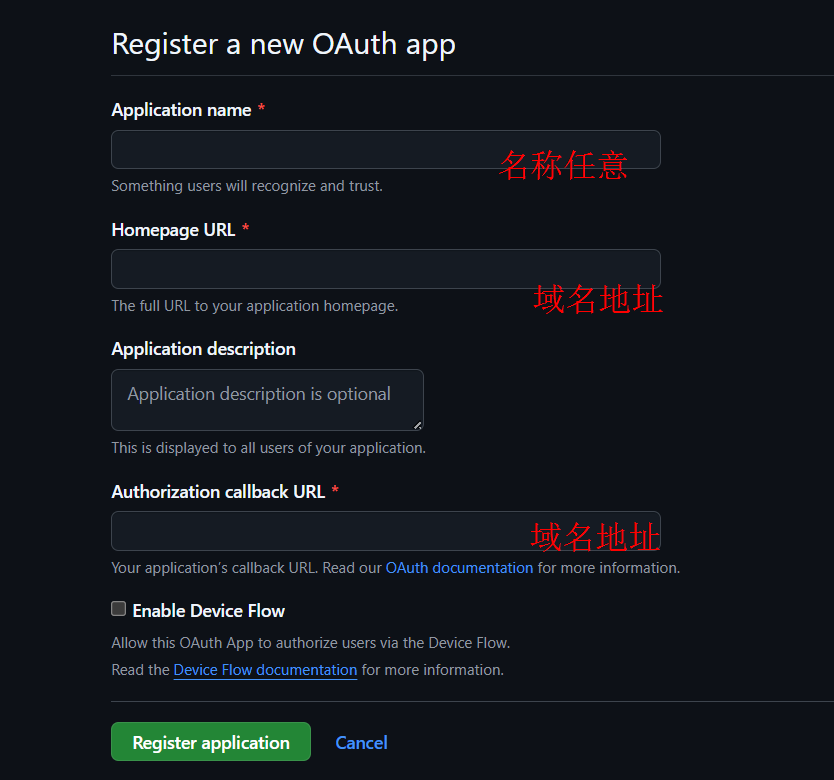
(2)点击Register application,跳转至新页面后,点击Generate a new client secret,并复制创建好的Client secrets。
(3)在blog\_config.butterfly.yml文件中评论配置部分。
comments:
  use: Gitalk

# Gitalk
# https://github.com/gitalk/gitalk
gitalk:
  client_id: #Client ID
  client_secret: #Client secrets
  repo: #仓库名
  owner: #GitHub用户名
  admin: #GitHub用户名
  option:
      language: zh-CN
      #每页展示数量,最多100
      perPage: 10
      #评论框的全屏遮罩效果
      distractionFreeMode: false
      #评论排序方式last、first
      pagerDirection: last
      #GitHub issue的标签
      labels: ['Gitalk']
      #是否启用快捷键(cmd|ctrl + enter) 提交评论
      enableHotKey: true
      #评论列表的动画
      flipMoveOptions: Fade
      #GitHub oauth 请求到反向代理
      proxy: https://cors-anywhere.azm.workers.dev/https://github.com/login/oauth/access_token