
Hexo-Butterfly美化教程-[6]开启博客评论
Giscus
创建新仓库
在github上创建一个新仓库,名称任意,设置为仓库公开,在Features中勾选Discussions。
安装配置Giscus
(1)点击链接安装配置Giscus:Github Apps - giscus。
(2)配置完成后点击Giscus网址进行配置,跳转giscus。
(3)在仓库框中输入用户名/创建的仓库名。
(4)在页面 ↔️ discussion 映射关系中选择Discussion 的标题包含页面的 URL。
(5)Discussion 分类选择 Announcements。
(6)特性和主题部分自行选择。完成后,将启用 giscus中的script内容填入blog\_config.butterfly.yml文件中评论配置部分。
1 | comments: |
Utterances
创建新仓库
在github上创建一个新仓库,名称任意,设置为仓库公开。
安装配置Utterances
(1)点击链接安装配置Utterances:GitHub Apps - utterances。
(2)配置完成后点击Utterances网址进行配置,跳转utterances。
(3)在repo:框中输入用户名/创建的仓库名。
(4)在Blog Post ↔️ Issue Mapping中选择Issue title contains page title。
(5)label (optional):框中可任意填写,建议填写 Utterances。
(6)Theme部分自行选择。完成后,将Enable Utterances中的script内容填入blog\_config.butterfly.yml文件中评论配置部分。
1 | comments: |
Gitalk
创建新仓库
在github上创建一个新仓库,名称任意,设置为仓库公开。
安装配置Gitalk
(1)点击New OAuth Application,注册GitHub OAuth app。
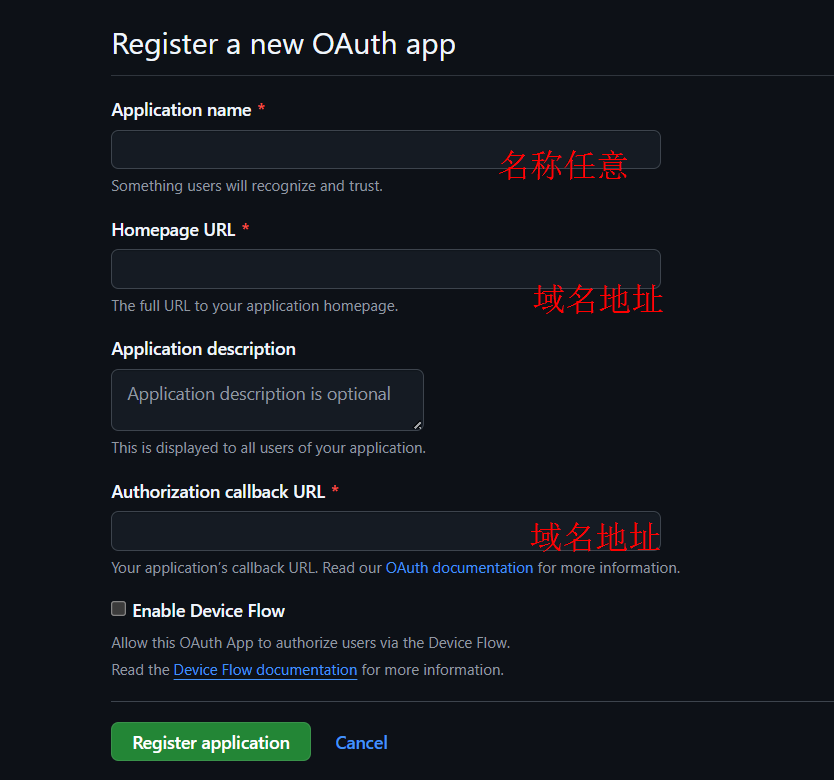
(2)点击Register application,跳转至新页面后,点击Generate a new client secret,并复制创建好的Client secrets。
(3)在blog\_config.butterfly.yml文件中评论配置部分。
1 | comments: |
博客搭建系列文章
- Gitalk自动创建评论Issues
- Hexo-Butterfly美化教程-[1]基础环境
- Hexo-Butterfly美化教程-[2]Butterfly主题安装
- Hexo-Butterfly美化教程-[3]建主要页面
- Hexo-Butterfly美化教程-[4]修改配置文件
- Hexo-Butterfly美化教程-[5]安装常用插件
- Hexo-Butterfly美化教程-[6]开启博客评论
- Hexo-Butterfly美化教程-[7]功能魔改(源码方式)
- Hexo-Butterfly美化教程-[8]随鼠标变幻的动态粒子线条背景
- Hexo-Butterfly美化教程-[9]繁沙
- 使用GitHub Actions实现Hexo博客的自动化发布
- 在Github上使用OsmosFeed搭建在线RSS阅读器(无需服务器)


